Welcome screens
The first screens explain the requirements for eligibility and the steps of the flow to open an account successfully. An overview about the flow, the mandatory requirements to be fulfilled to receive the disbursement are displayed. Click Get Started.

The welcome screens are placeholders where a bank can display marketing content about the process of opening a business account and the products it offers or photographs. Depending on the branding and advertisement strategies, a bank can use this space for commercial use.
What you will need screen
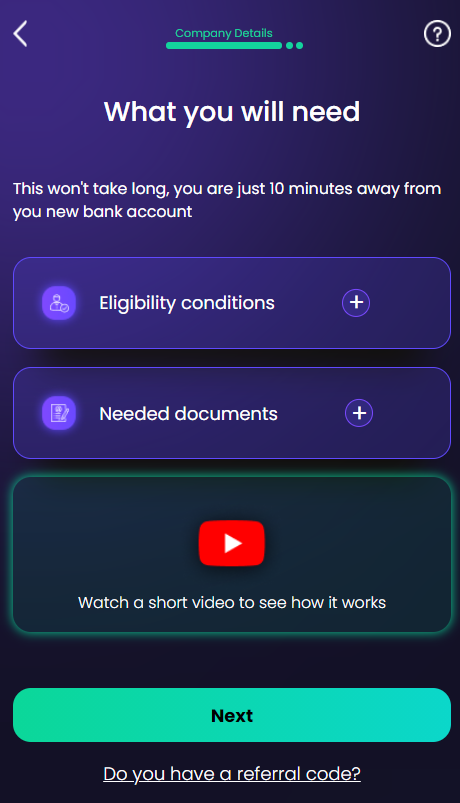
The second screen features an eligibility section with a few conditions that the SME Small and mid-size enterprises are businesses that maintain revenues, assets or a number of employees below a certain threshold depending on the country. must meet to be eligible for the business account:
-
Object of activity must not be gambling or firearms production or distribution;
-
Must not have active business relationships with companies in high-risk countries;
-
Must not be part of the Community Interest Companies
It is a business with primarily social objectives whose surpluses are principally reinvested for that purpose in the business or the community, rather than being driven by the need to maximize profit for shareholders and owners. (CICs), Right to manage companies Right to Manage (RTM) is the right of leaseholders to form a company to take responsibility for the management of their block. (RTMs) and Societas Europaea The European Company, known as SE (Societas Europea in Latin) is a type of public limited-liability company that allows you to run your business in different European countries using a single set of rules. (SEs);
Additionally, this screen features a list of documents that the applicant (SME representative) must have at hand:
-
Company incorporation documents;
-
Registration Certificate;
-
Finding certificate released at most 7 days prior to the moment of submission.
Below, there is a video showing how the digital solution works. Click Watch a short video to see how it works to launch the demo in YouTube.
Referral Code
There is a section for adding a referral code A referral code is a unique combination of numbers and/or letters used to identify the participants in a customer referral program of a bank. by clicking Do you have a referral code?. A pop-up window is displayed with the message Do you have a referral code? Enter it below and £100 will be credited in your account after you complete the onboarding process Formal onboarding encompasses the organized tasks and procedures to turn a person into the bank's customer.. Your promo code is: Insert the code and click Check it out.
To exit the pop-up, click outside the window. The journey is configured to credit the account with £100 after the onboarding process is completed. The sum as well as the description of the fields can be configured within FintechOS Studio.
For details on how it was configured, see Banking Product Factory.
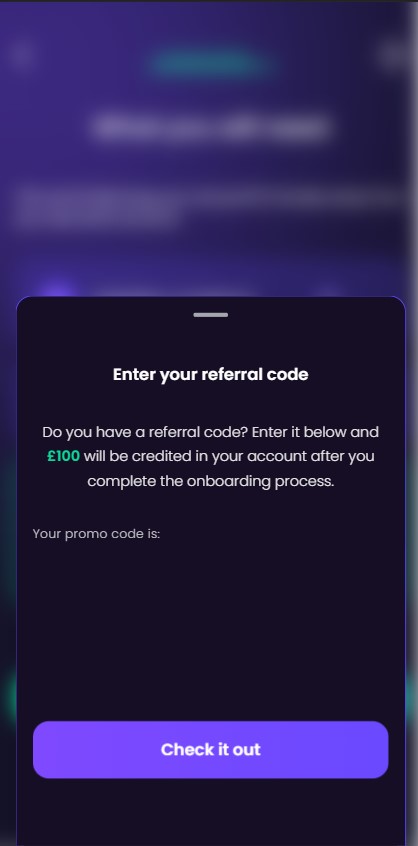
With the current configurations, any value inserted in this stage, the system accepts it as a referral code. With or without entering a referral code, click Next to continue the flow.