Digital Journey Settings
This section details the default Pet Insurance Quote & Buy Digital Journey according to the FintechOS Studio framework.
To access any digital journey record in FintechOS Studio, take the following steps:
-
In FintechOS Studio, navigate down the main menu to Digital Experience.
-
Click Digital Experience and next, click Digital Journeys, to open the Digital Journeys Menu, on the left.
-
Click Digital Journeys to open the Digital Journeys List page.
-
From the list, select and double-click the PetInsurance record to inspect the digital journey. When the form opens you can see all the digital flows attached to the Pet Insurance Quote & Buy customer journey listed in the grid, at the bottom of the form.
Below is an example of such record:
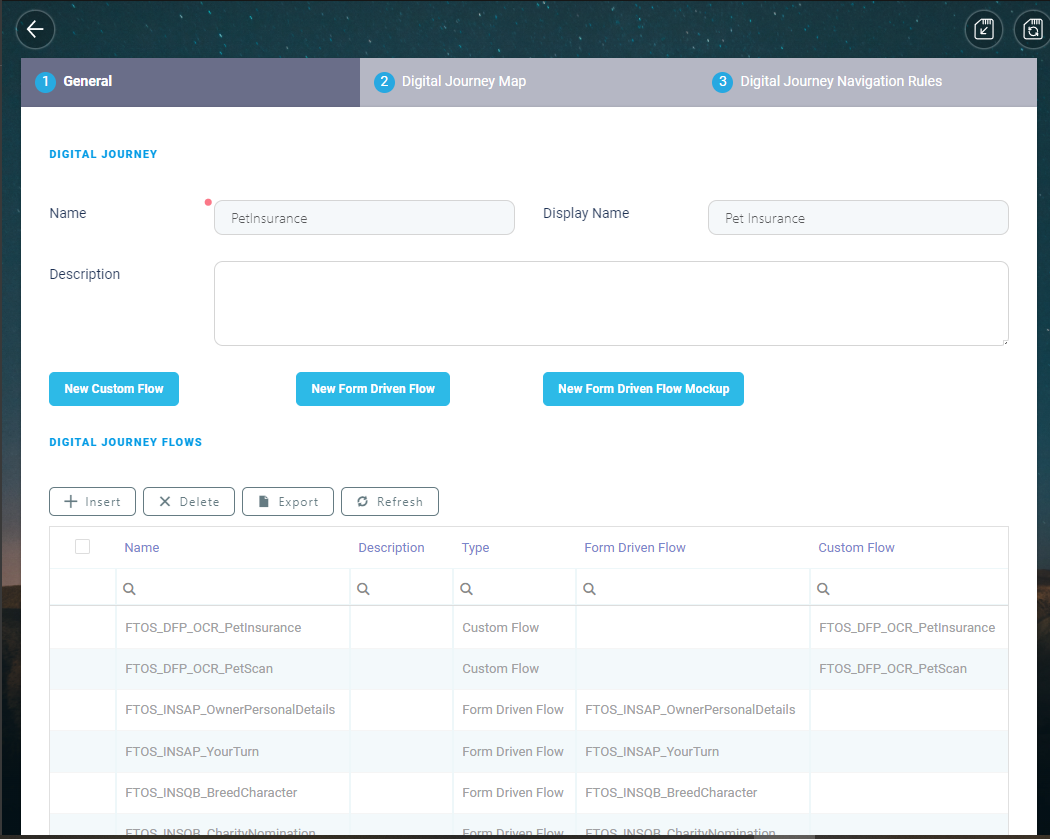
The Pet Insurance Digital Journey
The following are the settings for the Pet Insurance Quote & Buy digital journey:
 General Information
| Item | Description |
|---|---|
| Name | PetInsurance |
| Display Name | Pet Insurance |
| Description | Fully digital quote and buy process for customers seeking to get insurance for their pets - cats and dogs, from their phone. |
Journey Flows
| Name | Description | Type |
|---|---|---|
| Landing Page | Landing Page | Form Driven Flow |
| FTOS_INSQB_PetName | FTOS_INSQB_PetName | Form Driven Flow |
| FTOS_INSQB_NextBestFriend | FTOS_INSQB_NextBestFriend | Form Driven Flow |
| FTOS_INSQB_PetScan | FTOS_INSQB_PetScan | Form Driven Flow |
| FTOS_DFP_OCR_PetScan | FTOS_DFP_OCR_PetScan | Custom Flow |
| FTOS_INSQB_PetScanResult | FTOS_INSQB_PetScanResult | Form Driven Flow |
| FTOS_INSQB_BreedCharacter | FTOS_INSQB_BreedCharacter | Form Driven Flow |
| FTOS_INSQB_ManualPetDetails | FTOS_INSQB_ManualPetDetails | Form Driven Flow |
| FTOS_INSQB_MorePetDetails | FTOS_INSQB_MorePetDetails | Form Driven Flow |
| FTOS_INSQB_PetQuote | FTOS_INSQB_PetQuote | Form Driven Flow |
| FTOS_INSQB_ExcessAmount | FTOS_INSQB_ExcessAmount | Form Driven Flow |
| FTOS_INSQB_ContactDetails | FTOS_INSQB_ContactDetails | Form Driven Flow |
| FTOS_INSAP_YourTurn | FTOS_INSAP_YourTurn | Form Driven Flow |
| FTOS_DFP_OCR_PetInsurance | FTOS_DFP_OCR_PetInsurance | Custom Flow |
| FTOS_INSAP_OwnerPersonalDetails | FTOS_INSAP_OwnerPersonalDetails | Form Driven Flow |
| FTOS_INSQB_PaymentDetails | FTOS_INSQB_PaymentDetails | Form Driven Flow |
| FTOS_PYMT_DirectDebit | FTOS_PYMT_DirectDebit | Form Driven Flow |
| FTOS_PYMT_CardPayment | FTOS_PYMT_CardPayment | Form Driven Flow |
| FTOS_INSQB_Congratulations | FTOS_INSQB_Congratulations | Form Driven Flow |
| FTOS_INSQB_GoodLuck | FTOS_INSQB_GoodLuck | Form Driven Flow |
Navigation Rules
| EntityForm | Entity Form Step | Flow Control Rule |
|---|---|---|
| FTOS_INSQB_Congratulations | Congratulations | charityNomation |
| FTOS_INSQB_PetName | PetName | haventGotAPet |
| FTOS_INSQB_ContactDetails | Contact Details | termsAndConditions |
| FTOS_INSAP_YourTurn | YourTurn | scanIdCheck |
| FTOS_INSQB_PetScan | PetScan | checkAddManually |
| FTOS_INSQB_PaymentDetails | PaymentDetails | checkDirectDebit |
| FTOS_INSQB_PetScanResult | PetScanResults | checkCorrectBreed |
| FTOS_INSQB_BreedCharacter | BreedCharacter | endJourney |
| FTOS_INSQB_PetScanResult | PetScanResults | checkWrongBreed |
| FTOS_INSQB_PetScan | PetScan | checkPetScan |
| FTOS_INSQB_MorePetDetails | MorePetDetails | Age > 10 |
Entity Forms
To inspect the Pet Insurance Quote & Buy Forms, go to FintechOS Studio > main menu, on the left > Digital Experience > Digital Journeys > Form Driven Flows > Form Driven Flow List Page. Use the Search by Name option to find a particular Form and double-click it to view general data, flow map, steps, field options, filtered fields, header items, actions, scripts and security roles attached to that Form.
The Pet Insurance Quote & Buy customer journey uses the following Entity Forms:
| Nr. | Page Name | Current Entity | Display Name |
|---|---|---|---|
| 1. | FTOS_INSQB_LandingPage | FTOS_INSQB_Quote | Quote |
| 2. | FTOS_INSQB_PetName | FTOS_INSQB_Pet | Pet |
| 3. | FTOS_INSQB_PetScan | FTOS_INSQB_Pet | Pet |
| 4. | FTOS_INSQB_BreedCharacter | FTOS_INSQB_Pet | Pet |
| 5. | FTOS_INSQB_NextBestFriend | FTOS_INSQB_Pet | Pet |
| 6. | FTOS_INSQB_PetScanResult | FTOS_INSQB_Pet | Pet |
| 7. | FTOS_INSQB_ManualPetDetails | FTOS_INSQB_Pet | Pet |
| 8. | FTOS_INSQB_MorePetDetails | FTOS_INSQB_Pet | Pet |
| 9. | FTOS_INSQB_UnableToQuote | FTOS_INSQB_Quote | Quote |
| 10. | FTOS_INSQB_PetQuote | FTOS_INSQB_Quote | Quote |
| 11. | FTOS_INSQB_ExcessAmount | FTOS_INSQB_Quote | Quote |
| 12. | FTOS_INSAP_YourTurn | FTOS_INSAP_RetailApplicantData | Retail Applicant Data |
| 13. | FTOS_INSAP_OwnerPersonalDetails | ID Scan step | Retail Applicant Data |
| 14. | FTOS_INSQB_ContactDetails | FTOS_INSAP_RetailApplicantData | Retail Applicant Data |
| 15. | FTOS_INSQB_PaymentDetails | FTOS_INSQB_Quote | Quote |
| 16. | FTOS_PYMT_DirectDebit | FTOS_PYMT_DirectDebit | Direct Debit |
| 17. | FTOS_PYMT_CardPayment | FTOS_PYMT_PaymentCard | Payment Card |
| 18. | FTOS_INSQB_Congratulations | FTOS_INSQB_Quote | Quote |
| 19. | FTOS_INSQB_GoodLuck | FTOS_INSQB_Quote | Quote |
| 20. | FTOS_INSQB_CharityNomination | FTOS_INSQB_Quote | Quote |