Create and Activate a User
This is the alternative flow to creating a user and activating the Online and Mobile Banking without the checker approving the activation. It is a method to embed the Online and Mobile Banking solution in another flow such as an onboarding process or a loan/ mortgage origination. This functionality consists of:
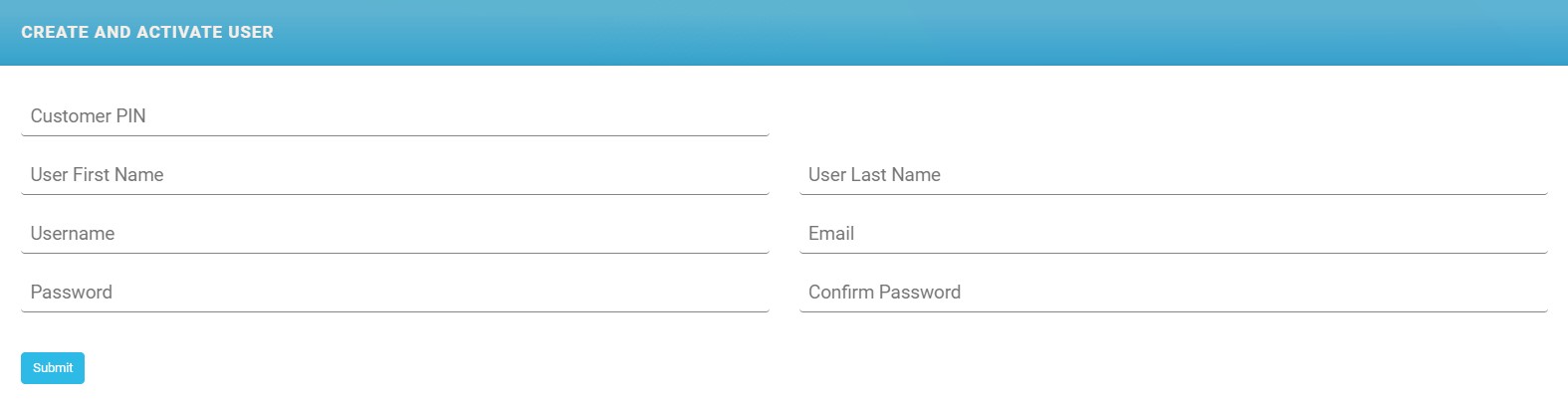
- collecting the data about the user (the screen below is purely demonstrative)
- activating the user x customer without the implication of the back-office of the bank
- gives rights on accounts and transactions.
IMPORTANT!
Unlike the first enrolment flow, there is no activation process done by the checker.
Unlike the first enrolment flow, there is no activation process done by the checker.
- Open the FintechOS Portal.
- Access the page Create and Activate User.
The page is available by opening the console and copy pasting the code:
Copyebs.goToUrl(ebs.getBaseUrl() + '/Main#/customform/FTOS_IB_CreateAndActivateUser') - Fill in the fields:
Field Mandatory Description Customer PIN Mandatory Insert the user's Personal Identification Number. User First Name Mandatory Insert their first name. User Last Name Mandatory Insert their surname. Username Mandatory Insert a unique username (used to log into Online and Mobile Banking). It must contain 10 characters. Email Mandatory Insert the user's email. It must be unique in the database. Password Mandatory Insert the password. The password must match the password policy in place. Confirm Password Mandatory Re-insert the password. - Click Submit. The outcome is that the user is associated with the customer, the status is
Activein User Client List and in the section tab Account/Transaction Selection the user has rights on all accounts and all types of payments.NOTE
We recommend opening Account/Transaction Selection after the user was created to modify the rights as needed.