Reports and Logs
Product and Channel Managers from the financial institution require information to steer the business. The reports dashboard enables the financial institutions to view the following information in the reports:
- Dashboard client report: metrics regarding total registered customers, active users, type of roles, etc.
- Transactions report: detailed analytic information regarding the payments initiated through online and mobile banking
- Application logs allow the admin users of the financial institutions’ to view the browser agent and IP addresses.
To support the activity, the back-office employees with specific roles can access data valuable to the business:
- Reporting and Audit log: viewing analytics on users (registered, active, passive, blocked, closed), customer types, and user types.
Role of the back-office employee: Channel Manager/Internal Audit.
- Mailbox: sending messages to customers and users.
Role of the back-office employee: Channel Manager/CRM Campaign Manager
- CRM Campaign: setting-up campaigns.
Role of the back-office employee: Channel Manager/CRM Campaign Manager
- Settings: changing of certain system parameters such as cut-offs, payment schemas active in the bank.
Role of the back-office employee: Channel Manager/System Administrator.
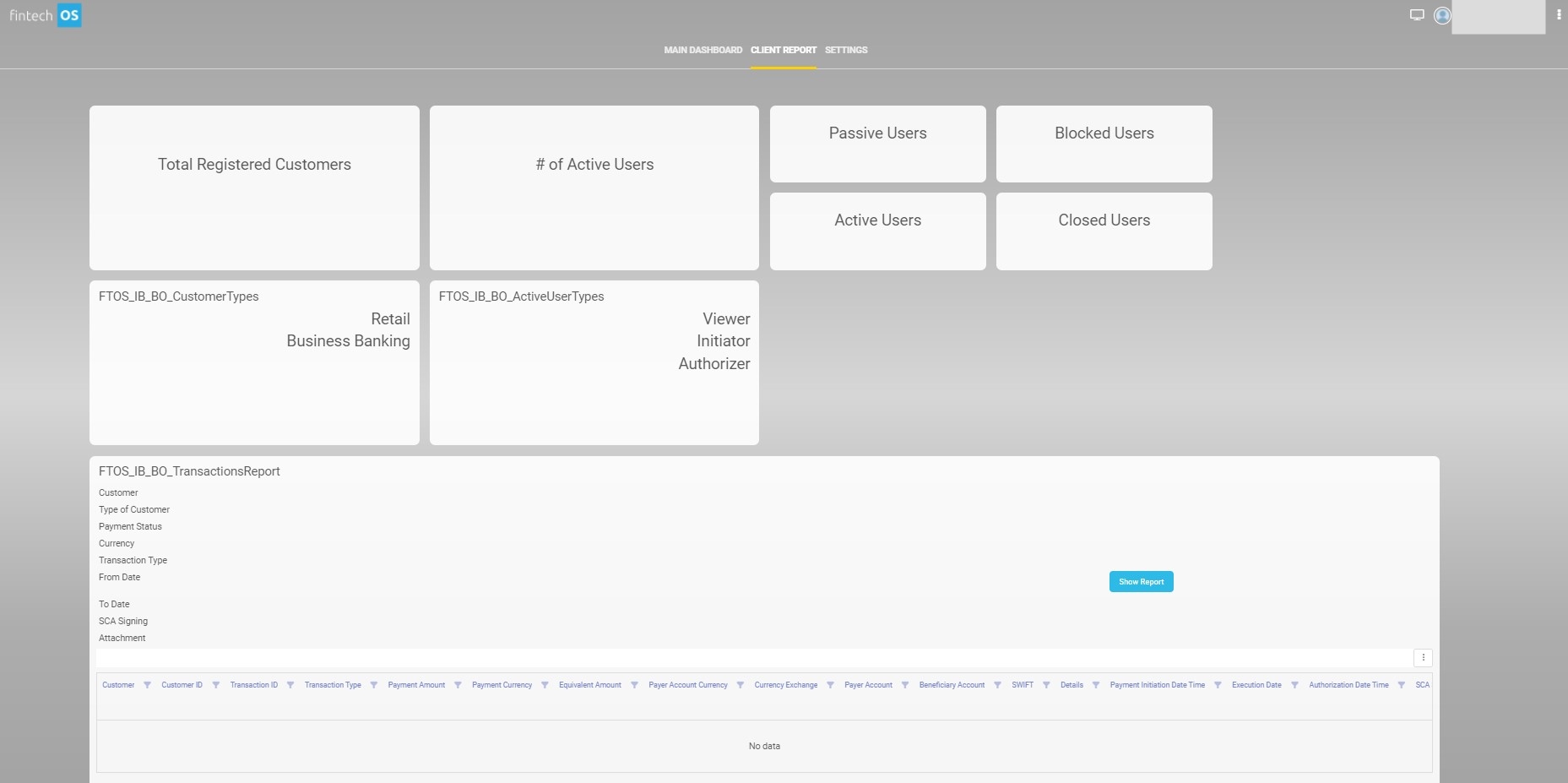
Dashboard Client Report
The first section of the dashboard contains an information analysis of the current situation of the users of Online and Mobile Banking. Eight widgets are displayed with numbers for the categories:
- registered
- % of the registered are active users
- active
- passive
- blocked
- closed
- customer types: retail and business banking
- active user types: viewer, initiator, authorizer.
The second part of the dashboard displays the Transactions Report, a report that presents the transactions for specific customers between specific dates. It exhibits data based on the information inserted into the filters:
To display data in the drop-down filters, type the letters of the word to receive a suggestion from the system.
| Filter |
Data Type |
Mandatory |
Description |
|---|---|---|---|
| Customer |
Option set |
N/A |
Insert the name of the customer you are looking to identify the transactions. Insert at least three characters for the system to search in the database. |
| Type of Customer | Option set | N/A |
Select the type of customer:
|
| Payment status | Option set | N/A | Select the payment status. |
| Currency | Option set | N/A | Type the letters of the currency abbreviation, e.g., BGN. |
| Transaction Type | Option set | N/A | Select the type of transaction. |
| From date |
Date |
Mandatory |
Select the beginning date by clicking on the calendar. It displays the dates until the day after the current date. IMPORTANT!
You cannot generate a report for transactions in the future. |
| To date |
Date |
Mandatory |
Select the final date for the report. It displays the dates until the day after the current date. |
SCA Strong customer authentication (SCA) is a requirement of EU Revised Directive on Payment Services (PSD2) on payment service providers within European Economic Area. The requirement ensures that electronic payments are performed with multi-factor authentication, to increase the security of electronic payments.[1] Physical card transactions already commonly have what could be termed strong customer authentication in EU (Chip and PIN), but this has not generally been true for Internet transactions across EU prior to the implementation of the requirement,[1] and many contactless card payments do not use a second authentication factor. Signing Strong customer authentication (SCA) is a requirement of EU Revised Directive on Payment Services (PSD2) on payment service providers within European Economic Area. The requirement ensures that electronic payments are performed with multi-factor authentication, to increase the security of electronic payments.[1] Physical card transactions already commonly have what could be termed strong customer authentication in EU (Chip and PIN), but this has not generally been true for Internet transactions across EU prior to the implementation of the requirement,[1] and many contactless card payments do not use a second authentication factor. Signing |
Option set |
N/A | Select the type of SCA. |
| Attachment |
Option set |
N/A | Select the attachment needed. |
Click Show Report to populate the dashboard with the results for the columns: customer (name of the customer), customer ID (the unique identification string), transaction ID (the unique identification string for each payment), transaction type, payment amount, payment currency, equivalent amount (the local currency), the payer account currency (the currency of the FROM account), currency exchange (the rate of exchange), payer account (the IBAN), beneficiary account (the IBAN of the TO account), the SWIFT code, the payment details, payment initialization date, execution date, authorization date-time, SCA signing, SCA signing reason, type of customer, status, attachment.
To export the data set, click the xlxs symbol on the top right-hand corner of the table.