Quotation Step
In this step, the agent must enter the customer's contract data, in order to provide them with the suitable quotation.
This step includes the Create Quote and List of Quotes sections.
The following action buttons are found in the Quotation Step screen:
-
Quit: When the user clicks this button, a confirmation pop-up is displayed with the following question: ‘'Are you sure you want to quit?’'. If the user chooses ‘'Yes’', the quotation history list is displayed and the status of the quotation is changed to Closed.
-
Previous: When the user clicks this button, the previous Personal Data step is displayed. If some data have been already filled, when clicking the Previous button, the system notifies the user that changes were made and a pop-up message is displayed, asking the user if they want the data to be saved.
-
Next: When the user clicks this button, the Summary screen is displayed. If clicked before a quotation is saved and chosen, the following blocking message is displayed: "Please save and choose a quotation". If clicked before a quotation is chosen, the following blocking message is displayed: "Please choose the desired quotation".
-
Calculate: If the user clicks this button before filling in a value for the Term Life sum insured, the following message is displayed: "Please add a value for the Term Life coverage". If clicked before choosing values for the fields from the Create Quote section, which are mandatory:
-
The following message is displayed: "Please fill in the mandatory fields".
-
A distinct sign next to the unfilled mandatory fields is displayed.
-
-
Save Quote: If the user clicks this button before clicking the Calculate button, the following message is displayed: "Please press the Calculate button before trying to Save Quote!". If everything is alright, and the user clicks Save Quote, the following pop-up confirmation message is displayed: "Are you sure you want to save the Quote?", with the Yes and No possible options.
The sections of the Quotation Step are described below.
 Create Quote
The following fields displayed in this section allow the agent to configure a quote version to be proposed to the client:
| Field | Description |
|---|---|
| Currency | This field holds the currency of the quote. The possible values are GBP, EUR, RON, the default value being "none". |
| Payment Frequency | Drop down field, where the possible values are annually, half yearly, quarterly, monthly, the default value being "none". |
| Policy Term | Drop down field, where the possible values are 10, 15, 20, 25, the default value being "none". |
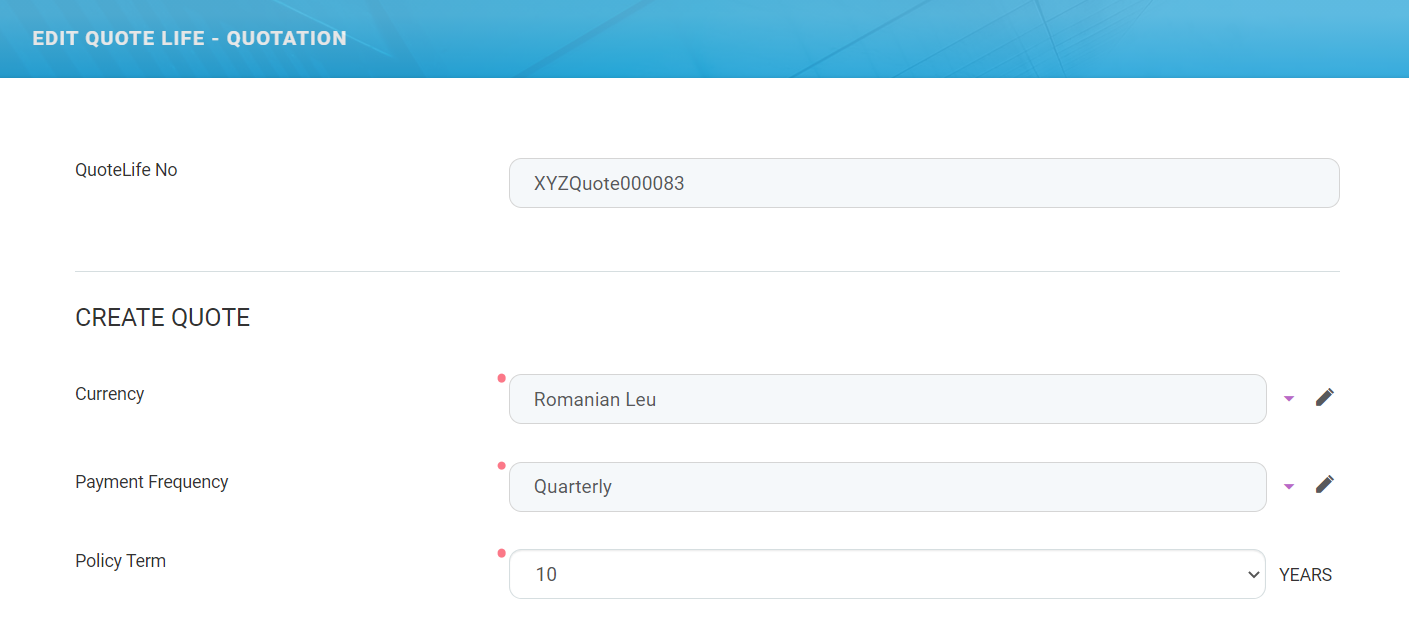
A grid below displays the coverage options and it presents the following headings: Coverage, Sum insured, and Regular Premium, the latter representing the premium amount according to the frequency. The two coverage options are given below:
-
Term Life - it is mandatory and the user is not able to select or deselect this option. The Sum Insured column is mandatory for the Term Life row, and the user must add a value between 1 and 500,000 EUR, or the equivalent in RON or GBP.
-
Critical Illness - it is optional and the user is able to select or deselect this option. Here, the Sum Insured column is read-only. A label is displayed after selecting the CI rider "Included". If the insured is diagnosed with a critical illness, the policy stops and the insured receives the critical illness benefit, meaning the sum insured for the base product, Term Life. The user cannot select the CI rider before filling in a value for the Term Life sum insured, otherwise the following message is displayed: "Please add a value first for the Term Life sum insured".
The premium amount according to the frequency is populated with values according to the sum insured, age, etc., after pressing the Calculate button.
The value of the TOTAL field in this grid is the sum of premium amounts according to the frequency for both coverages, and is populated only after pressing the Calculate button.
Under this grid, a list with all the saved quotations is displayed.
When the user clicks the Calculate button, the premium amounts are calculated and displayed in the grid from the Create Quote section, without creating a new record in the List of Quotes section.
Term Life and Critical Illness Rates
The standard premiums are calculated based on the provided rates and the sum insured introduced. The rates differ depending on the policy term and age of the insured person. The premium rates are:
-
Per cent (per €100 sum insured);
-
For annual premiums. The annual premium amount calculated from the table is divided by the premium frequency selected as required;
-
Gender neutral;
-
Rounded to 5 decimal places.
The premiums for the Critical Illness rider are an additional 10% added to the Term Life Benefit premiums. For example, if the Term Life premium is 100 euro, the Critical Illness premium is 10 euro.
The system takes into consideration the CI rider when applying 10% extra only the standard rates. For example, when an extra premium of 25% is needed for the Term Life benefit because of the insured’s occupation for example, the extra 10% for CI rider is applied taking into consideration the premium for Term Life before the increase.
There is a minimum amount for the premium of the Term Life benefit, depending on the frequency, as following:
-
100 Euros annually;
-
50 Euros half-yearly;
-
25 Euros quarterly;
-
10 Euros monthly.
These values above are expressed in Euros, however, the minimum premium is also valid for the other currencies. The system first calculates the values in Euros, then performs the conversion into the selected currency and displays the values. The 10% additional premium required for the CI rider is on top of the minimum Term Life premium. The extra premium required in some cases because of the occupation or other causes is on top of the minimum Term Life premium.
The user introduces the sum insured for the Term Life cover and, after clicking Calculate, if the premium for the Term Life cover results below limit, instead of displaying the premiums, the following message is displayed: "The minimum sum insured for the Term Life cover must be X", where X = the minimum sum insured calculated by the system based on the table rates for that specific client, considering also the ANB, the policy term and the chosen frequency .
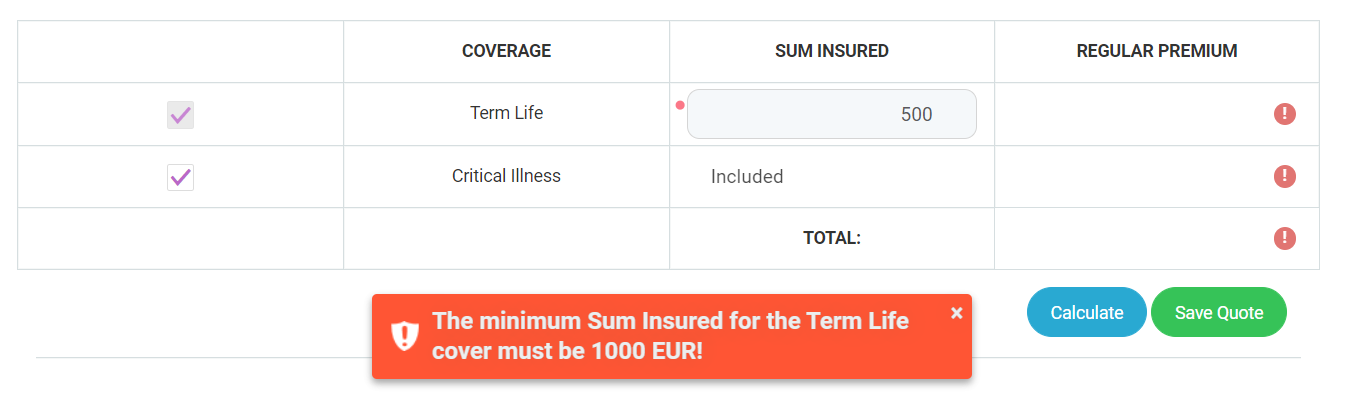
The message is displayed every time the user clicks Calculate and the premium results below limit. The info message is a pop-up, with an OK button. After that, the user has the possibility to fill in another value for the Term Life sum insured. The following scenarios are available after when the user clicks Calculate.
After the user calculates a quote in a specific currency,
Scenario 1
If the chosen frequency is half-yearly, quarterly or monthly, next to the total premium, after the currency, the * symbol is displayed, and under the total premium, the following message is displayed: "The total premium includes a policy fee of X EURO", where X is the value of the policy fee, added to the total premium based on the selected payment frequency.
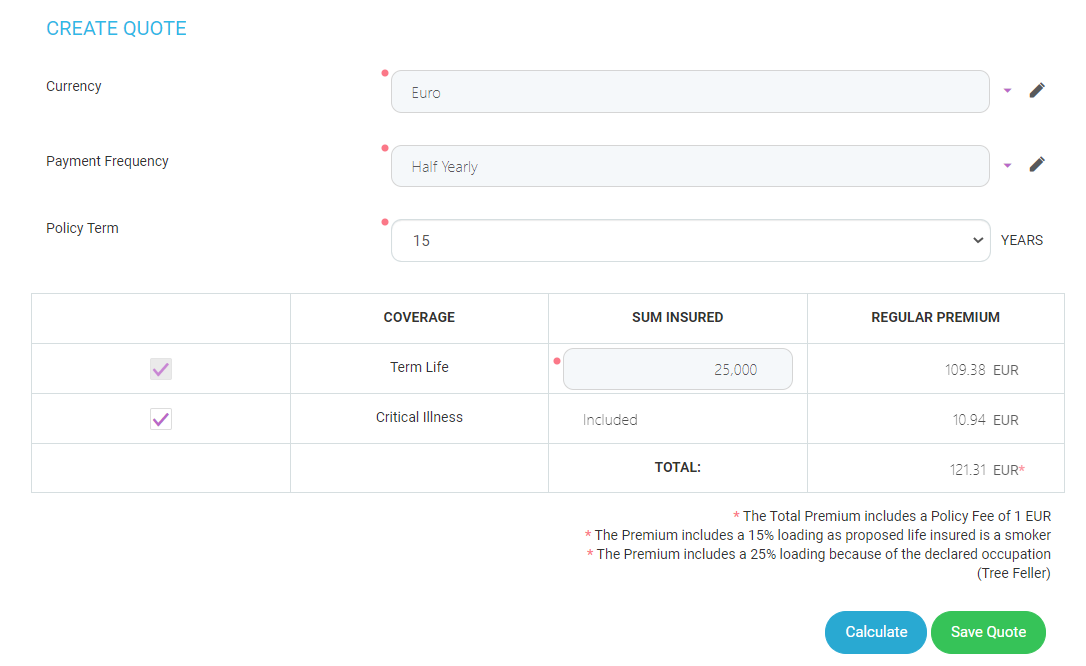
This is added to each premium due, so, for example, a half-yearly premium calculated as €85,25 including CI becomes €86,25 after adding the fee, as presented above.
According to the frequency, the policy fees are:
-
Annual - €0.00 (in this case, no message is displayed);
-
Half-yearly - €1.00;
-
Quarterly - €1.25;
-
Monthly - €1.50;
The currency next to the value of the fee is dynamic and modified depending of what the user chose as currency in the above section.
The value of the fee in other currencies is calculated based to the exchange rate.
Scenario 2
If in the Personal Data step, for the insured or policyholder/insured, the answer for the question "Have you used nicotine products in the last 12 months?"' is "Yes", the total premium represents the standard premium increased by 15%.
Next to the total premium, after the currency, the * symbol is displayed and under the total premium, the following message is displayed: ‘'The premium includes a 15% loading as proposed life insured is a smoker’'.
Only after the user decides for a certain quotation and presses Save Quote, a new record is created in the "List of Quotes" section.
The quotation expires if it exceeds a specific number of days since the first calculation is saved, or since its last status transition, for better quotation management. Thus, the quotation status is changed to Expired. The following cases are possible:
Case 1
In the Quotation step, after the user successfully clicks the Save Quote button for the first time , a new record is created in the List of quotes section and the quotation status is changed from In progress to Initial quotation.
The quotation receives an expiry date, which is displayed in the Quotation history list. Until this moment, the Expire date field related to this quotation in the Quotation history list, is empty.
Afterwards, even if the user saves other quotes, in the following days, the expiry date of the quotation remains the same: 30 days since its status became Initial quotation, since the first time the user successfully clicks the Save Quote button.
The status of the quotation is changed to Expired if the following conditions are met simultaneously:
-
The quotation is in one of the following statuses: Initial quotation, Final quotation or Generated quotation;
-
The quotation exceeds the expiration validity of 30 days from the moment its status becomes Initial quotation until the moment the user successfully clicks the Apply for cover button in the Summary step.
When the user will successfully clicks the Apply for cover button, the quotation changes its status from Generated quotation into the next status.
For example, if the quotation is saved on 02.07.2021, the expiry date is 01.08.2021.
A job performs the status transition into Expired, which runs everyday verifying the conditions above. The number of days, in this case 30, is a flow parameter and is configurable.
Case 2
The status of the quotation is changed to Expired if the following conditions are met simultaneously:
-
The quotation is in one of the following statuses: Initiated, Applicant data or In progress;
-
The quotation exceeds the expiration validity of 15 days since its last status transition.
A job performa the status transition into Expired, which runs everyday verifying if the quotation, in one of the 3 above statuses, exceeds the expiration validity of X days since its last status transition, where:
-
X = flow paramenter, configurable;
-
X = in our case, 15.
For example, the quotation has been in the Applicant data status for 15 days. Today, when the job runs, it finds that the quotation has been kept in the same status for 15 days and changes the status from Applicant data into Expired.
List of Quotes
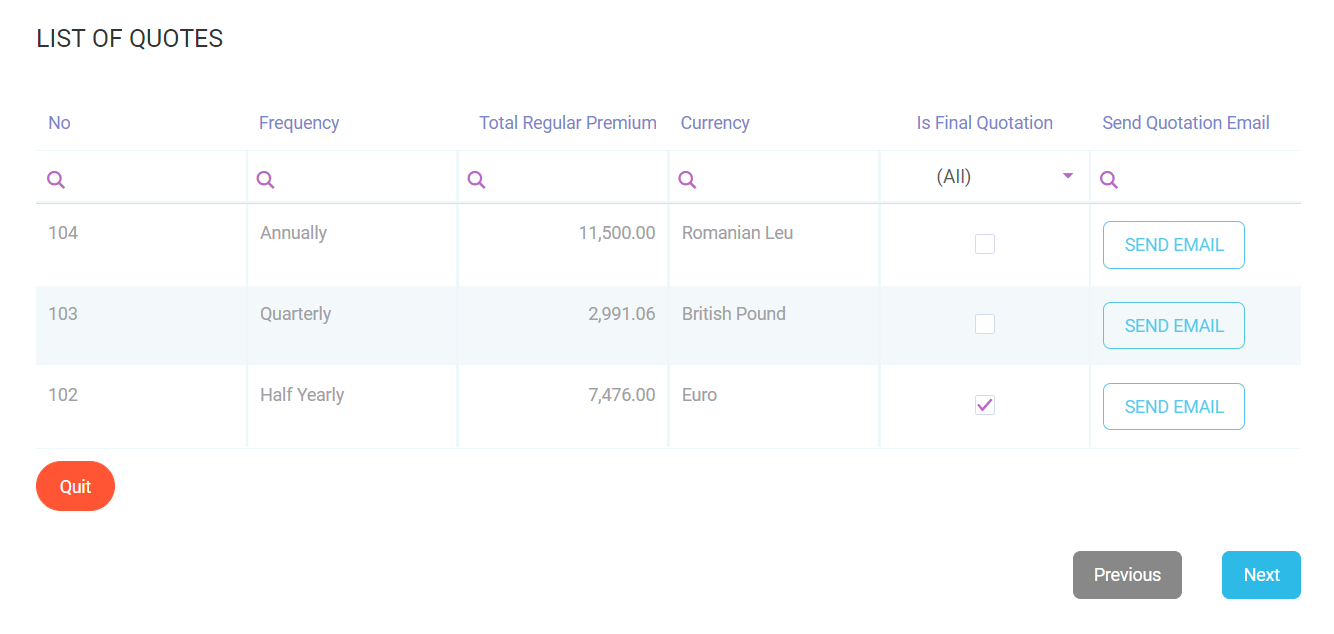
In this section, a grid is displayed, listing the quotes created in the form above. The grid presents the following column headings:
-
No: The number of the record.
-
Frequency: The frequency of the saved quotation.
-
Total Regular Premium: The value from the TOTAL field above, of the saved quotation.
-
Currency: The currency of the saved quotation. The system automatically calculates the amounts in other currencies than EURO by using the BNR exchange. If the user chooses a currency other than EURO, then the calculated amounts change according to the exchange rate. The system first calculates the premiums in euro and then performs the conversion in other currencies.
-
Is Final Quotation: The user can only select one quotation from the list.
-
Send Quotation Email: The Send Email button is displayed for the saved quotation. This button works for every quotation, regardless if the ‘'Choose the final quotation’' box is not checked.
Please refer the email templates.