Business Functionalities
Here are the Core Policy Admin functionalities, from a business perspective:
 Automated Flows
When they satisfy some given conditions for changing their business status, policies can automatically be handled by the solution. Core Policy Admin has the capability to meet the following policy administration needs, without intervention from an operator:
Policy Origination
The Policy issuance process represents the main Core Policy Admin functionality through which the insurance contracts are generated within the Core system, on the basis of which the other Core Policy Admin processes are based.
From a business perspective, this functionality involves an end-to-end process that starts from the generation of the initial policy through a specific endpoint, is updated through an update endpoint and then moves to InForce business status, according to the contractual Start Date.
The policy issuance endpoint brings business value to the Core Policy Admin component by creating a connection between various external systems and the core system. Thus, once the integration with another system in order to take over the information is achieved, the policy is generated in the system according to the information received with reference to the policy to be created.
Within this endpoint, a policy generation object is structured which contains all the information that must be taken over within an integration with an external system.
Following the request made, the response body executes the populating of the system with new data specific to the policy, in addition to those obtained during the data collection from an external system.
Other Automated Flows:
Policy lapsing
When they satisfy some given conditions for lapsing, policies can automatically be moved from InForce to Lapsed status. Lapsing occurs when there is no payment, for an agreed period of time, of the latest installment on the contracted policy. The lapsing process of a policy represents an automatic process performed by means of configuration items specific to the lapsing process: the DAUDD insurance flow parameter and the FTOS_PA_Policy Lapsed scheduled job.
Policy maturity
When they satisfy some given conditions for termination, policies can automatically be moved from InForce to Maturity status. The solution has an automated job in place in order to help with moving the policies to Maturity status.
Policy renewal
When they satisfy some given conditions for renewal, policies can automatically be moved from Maturity to Renewed status. The solution has an automated job in place in order to help with moving the policies to ready for renewal procedures.
InForce Flow
The enforcement process is a straightforward process that aims to activate the policies in the system that have an initial status, meaning that the policies are currently active and providing insurance coverage in return for premiums paid as agreed. The phrase “in force” refers to the policy at the time it is evaluated.
With their enforcement, the policies become valid and various other operations can be performed within them, such as: inclusion in reports, activating the statement generation process and the possibility of paying them for the policies in question, going through termination processes and more.
During its lifetime, until the End Date set on the contract level, the policy is InForce as long as the policy holder has been paying his insurance as per the payment agreement or has paid their premiums in full amount.
When a policy is deemed InForce, the policyholder is entitled to the policy's benefits. Depending on the type of insurance and policy purchased, the InForce time and date may vary. In addition, the conditions for when the policy lapses due to missed payments or what causes the policy to be voided are also configurable.
Process description
The enforcement process involves changing the status of the policies in the system - having the Issued status, once they reach the Policy Begin Date. There are 2 possibilities to trigger this process:
1. Automatically - if the current product is configured with the Insurance Product Factory to allow the Automatic InForce process.
2. Specific request in order to make the policy InForce.
In the picture below: Automatic InForce configuration at the level of the product, made with the Insurance Product Factory solution.
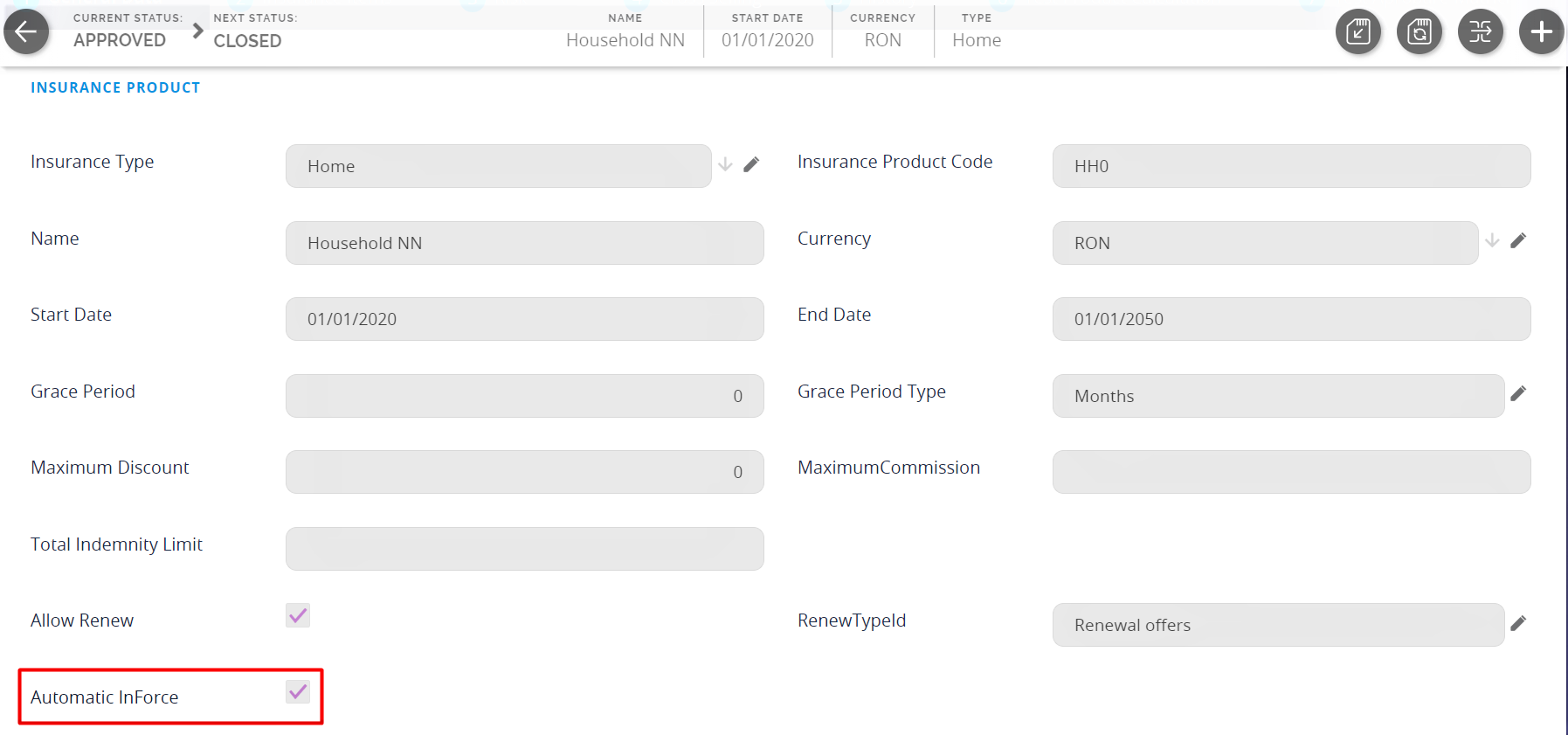
1. Automatic InForce = True
In order to automate this process, within the system there is the related configuration item, more precisely the scheduled job FTOS_INSPA_Policy_IssuedToEnforced which involves a daily run in order to check the condition of the Policy Begin Date being the Current Date for all policies in the system, in Issued status. Once this condition is met, for the related policies, the status is automatically changed to InForce.
In the picture below: the policy InForce flow
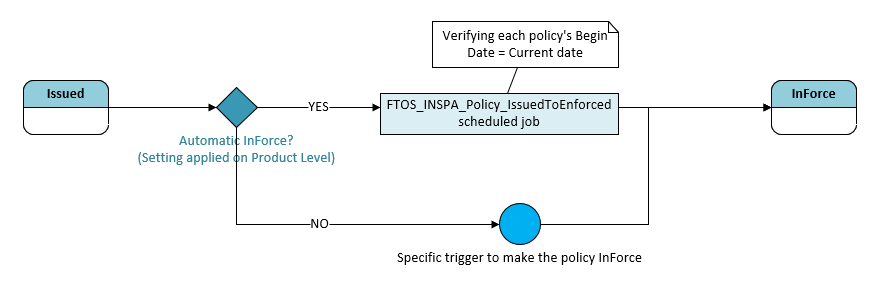
2. Automatic InForce = False
If a method other than Automatic InForce is employed, this process may occur following an external request that triggers the policy change from Issued to InForce.
Thus, such a trigger can come either from a specific call through policy update endpoint, or through an automatic trigger according to specified business requirements such as the integration of Policy Confirmation Files that, once arrived and processed in the system, it also changes the status of the policy - if the Policy Begin Date is the Current Date.
Policy Cancellation
The Cancellation flow is used to manage the process of policy termination. It allows the user to find a desired policy based on some searching parameters and to create and manage a policy termination request. The solution allows policy operators to achieve efficiency in a timely manner.
A Core Policy Admin user registers any customer termination request based on the following steps:
· Identify the policy and the customer
· Calculate Returned Premium based on Returned Premium rules
· Send request to approval
· Continue with the Payment Return flow
A Core Policy Admin super user should approve the termination request if Returned Premium is greater than 0. The system creates payments for each approved request with Returned Premium greater than 0.
Explore more details about the business steps and transitions and the conditions, parameters and jobs related to the above mentioned automatic flows that already accommodated inside the Core Policy Admin module.