formData.model
(FintechOS Studio 20.1.1 and later)
Provides read/write access to the values of the attribute values on the current screen or form. If you update a field value, it is saved to the corresponding attribute record when the screen or form is saved.
The attributes must be available in the screen's data context. For more information, see Screen Exposed Data.
Starting with FintechOS 8, workflows have replaced digital journeys as the default user experience. The information below is provided for backward compatibility with legacy form driven flows:
- In versions prior to 24.2, formData.model interacts only with fields displayed on the current form, not the full data model. If an attribute is not visible on the form, it cannot be accessed.
- Starting with release 24.2, you can access attributes that are not rendered in the UI. However, they must still exist in the form’s data context (for example, as hidden attributes), otherwise their values will not be saved. To retrieve attribute values directly from the database, see ebs.getFormEntity.
Return Value
Returns a JSON object containing key-value pairs for the current record's attribute names and attribute values. You can use the dot notation or bracket notation to access individual record attributes, for example:
formData.model.elapsedTimeor
formData.model['elapsedTime']Referencing Workflow Attributes
Workflows include complex data domains with multiple entities and relationships. When working with workflow screens, you must specify an attribute's property path accordingly:
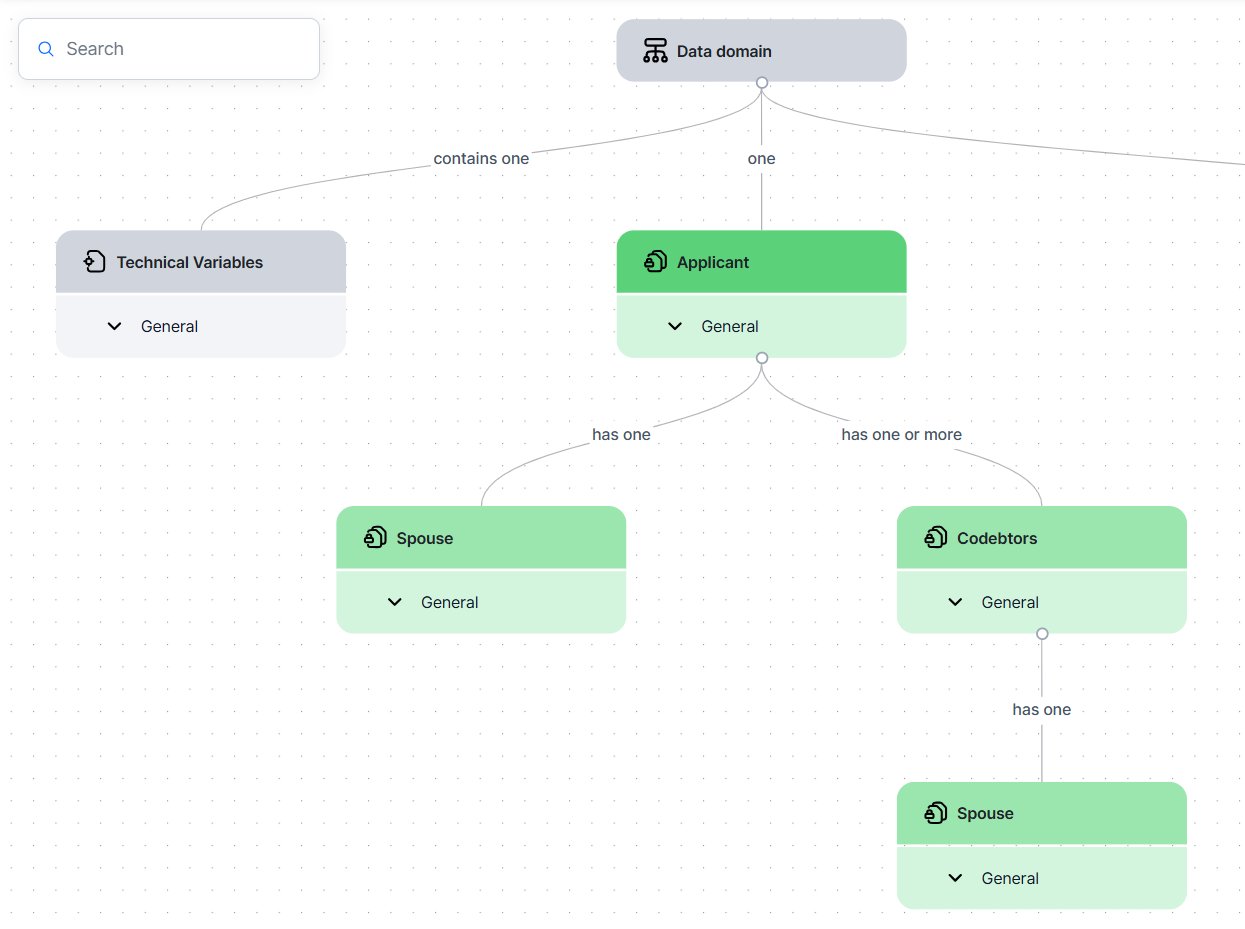
| Example | Method Call | Notes |
|---|---|---|
| Applicant's first name | formData.model.applicant.firstName1
|
For top-level data objects, you must specify both the data object and attribute name. |
| Applicant's age | formData.model.technicalVariables.age
|
|
| First name of the applicant's spouse | formData.model.applicant.spouse.firstName2
|
For 1-to-1 relationships, use dot notation to traverse the hierarchy. |
| First name of the applicant's first codebtor | formData.model.applicant.listOfCodebtors[0].firstName3
|
For 1-to-many relationships, the child entity records are accessed as lists using the following notation:listOf<entity name>.[0] referst to the first item. |
| First name of the applicant's first codebtor's spouse | formData.model.applicant.listOfCodebtors[0].spouse.firstName4
|
Use dot notation to specify the full property path from the top-level entity to the attribute. |
Examples
 List a Loan Applicant's Codebtors in the Browser Console
This example retrieves all codebtors associated with the current applicant record and outputs their full names (first name and last name) as a single formatted string, with each codebtor displayed on a separate line.
The applicant and codebtors entities are in a one-to-many relationship, which is why the codebtors are accessed as a list using the listOfCodebtors collection.
const codebtors = formData.model.applicant.listOfCodebtors;

const fullNames = codebtors.map(codebtor => {
  return codebtor.firstName2 + ' ' + codebtor.lastName2;
});

const result = fullNames.join('\n');

console.log(result);In this example, we track the duration in milliseconds between when a form is opened and when the final step (the Thank You screen) is displayed.
In the first form step's afterGenerate.js script, we store the current time in a variable called start:
formData.setAdditionalValue('start', new Date());For details on how to define an object that can be accessed in subsequent form steps, see formData.setAdditionalValue.
In the last form step's afterGenerate.js script, we save the duration in milliseconds passed since the first form step was opened in the elapsedTime attribute of the current record.
formData.model.elapsedTime = (new Date() - formData.getAdditionalValue('start'));For details on how to read an object that was defined in a preceding form step, see formData.getAdditionalValue.