ebs.isFtosNative
(FintechOS Studio 20.2.1 and later)
Returns True if the user agent is "FtosNative" and False otherwise.
Allows you to determine if the user session was initiated from a FintechOS Native iOS or Android mobile application.
Syntax
Copy
const isFtosNative: boolean;Examples
 Prompt users to install a dedicated mobile app for a web service
In this example:
- We create a function called getApp to redirect users to the https://www.apple.com/app-store/myApp if they agree to install the app. For details on how to navigate to a URL, see ebs.goToUrl.
- We check if the user has initiated the session from an iPhone device, but not from a FintechOS Native mobile application (!ebs.isFtosNative).
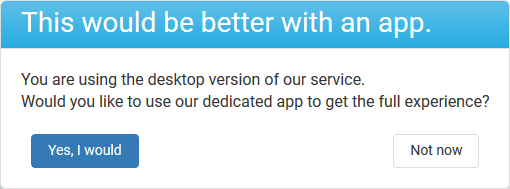
- If true, we display a confirmation window that allows the user to either go the Apple app store page to install the dedicated app or just proceed with the session. For details on how to display confirmation windows, see ebs.confirm.
Copy
function getApp(){
    ebs.goToUrl('https://www.apple.com/app-store/myApp')
};

if (!ebs.isFtosNative && navigator.platform == 'iPhone') {
    ebs.confirm(
    {
        title: 'This would be better with an app.',
        message: '<p>You are using the desktop version of our service.<p><p>Would you like to use our dedicated app to get the full experience?</p>',
        yesButtonLabel: 'Yes, I would',
        noButtonLabel: 'Not now'
    }, getApp, null)
}
The resulting confirmation message will look like this: