Configurations Walkthrough
The following chapter of this guide is meant to explain how to use the Lexis Nexis Connector in digital journeys, as well as the technical details of how the connector helps return data.
The Lexis Nexis Connector is configurable to fit the business needs of any financial institution to help simply the verification process and reduce risk exposure. This connector can be integrated in their digital journey to have easy access to fraud databases. The information retrieved is updated and it offers a better insight on current or potential customers and businesses.
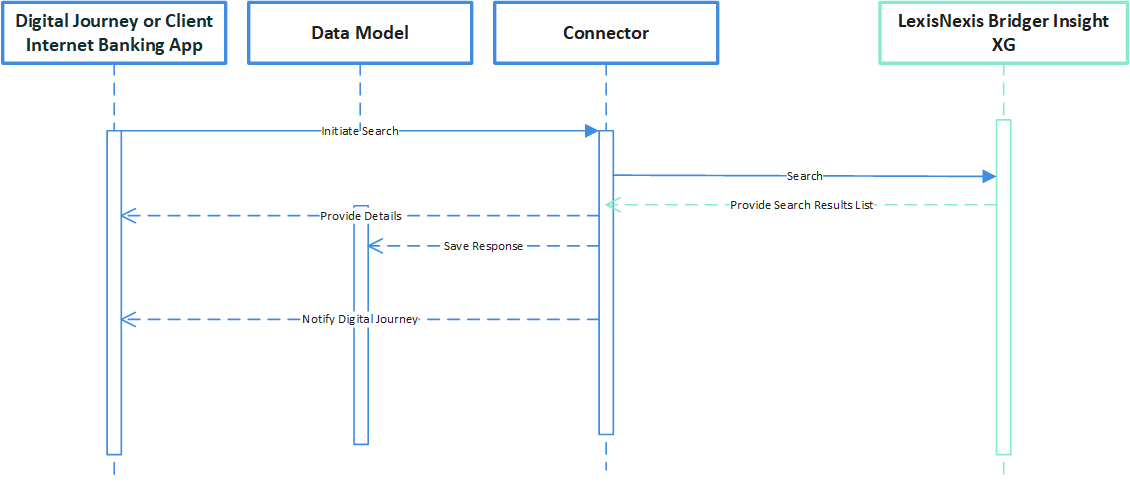
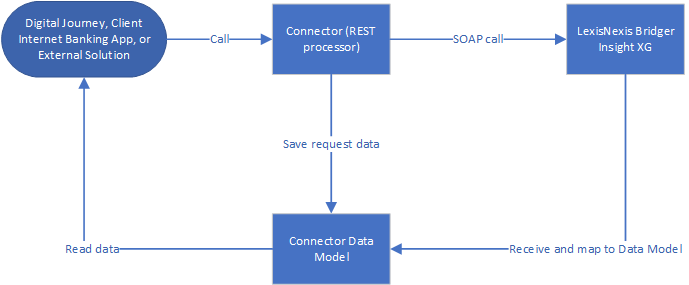
For example, in a loan origination process, where a potential customer wants to borrow a certain amount from a financial institution, along with other eligibility steps, an identity verification step is mandatory. To accelerate the screening process and eliminate any risks that the institution takes, the FintechOSLexis Nexis Connector can be accessed from their digital journey. The bank clerk searches the database for potential fraud triggering the external call to the endpoint exposed by the Lexis Nexis Connector. Then, the connector calls the LexisNexis Bridger SOAP service and the data received is saved in the connector's data model, that can be viewed in the Data Model page. Thus, the retrieved information saved in the data model is displayed in the bank clerk's digital journey allowing them to simply continue the loan origination process.
The LexisNexis Bridger Insight XG SOAP (Simple Object Access Protocol) and REST (Representational State Transfer) APIs allows the incorporation of its functionality into existing systems such as digital journeys, banking applications, and so on. This functionality permits bank employees to manage access, search, and obtain results and lists. Each request has a SOAP message with a defined action method to perform.
The REST API provides several interfaces as well (search or predefined search). Each request sends a json message with a defined action to perform.
For more information on how to use the connector in digital journeys and the server automation script, see the following pages:
-
Server Automation Script
The image below is an UML diagram showing the Lexis Nexis search workflow. To download the diagram in Visio, click here.
The image below is a sequence UML diagram showing the main actions that the bank clerk takes when searching for particular records. To download the diagram in Visio, click here.