Search Postcodes and Addresses
The FintechOS Ideal Postcodes Connector offers the possibility of searching databases for valid address data. Institutions can add the connector to a digital journey and retrieve the needed information from public records. This functionality helps speed up onboarding processes and validating addresses.
The below walkthrough is a proposition on how to use the FintechOSIdeal Postcodes Connector in a digital journey to search for accurate address data.
Follow the below steps to access and retrieve information using this connector.
1 Access Ideal Postcodes Connector
1. Log into the FintechOS Portal using the given credentials.
2. Log into the Ideal Postcodes platform with the credentials provided by them.
The user and password are obtained from the Ideal Postcodes platform. Additional information can be found on the Installation page.
3. From the FintechOS Portal main menu expand My Projects and click Postcodes.
4. Select Search by Address or Postcode. The FTOS_EXTD_POST_Addresses_Search List page opens.
5. At the top-right corner of the screen, click the Insert button. The Add FTOS_EXTD_POST_Addresses_Search- Addresses Search page opens. Fill in the following fields:
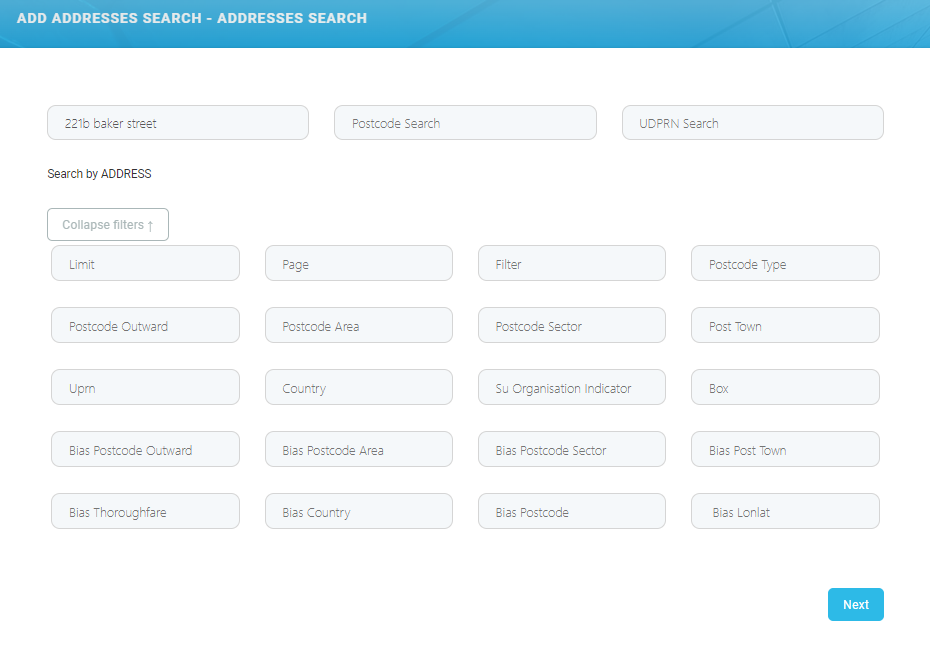
To make a search, only the postcode or a part of the address (for example the street name) is needed. Adding extra information in the available fields returns structured and accurate data. To add additional data to the search, click the Expand filters ↓ button.
When the search is made using the address and the postal code, then the results returned are based on the address. If the inputted data includes the UDPRN number, then the results returned are based only on the UDPRN.
| Field | Required | Type | Description |
|---|---|---|---|
| Address Search | Yes | Text | Input the UK address. details |
| Postcode Search | Yes | Text | Input the UK postal code. For example: SW1A 2AA |
| UDPRN | Yes | Text | Input the Unique Delivery Point Reference Number. The UDPRN is an 8-character code used by Royal Mail to identify unique delivery addresses. |
| Limit | No | Numeric | Specifies the maximum number of suggestions to retrieve. The default limit is 10, unless a postcode is queried, then all addresses at that postcode are returned. |
| Page | No | Numeric | 0 indexed indicator of the page of results to receive. Virtually all postcode results are returned on page 0. A small number of Multiple Residence postcodes may need pagination (for example, if there are more than 100 premises). |
Filter | No | Text | Comma separated whitelist of address elements to return. |
| Postcode Outward | No | Text | Filter by outward code. |
| Postcode Area | No | Text | The postcode_area. For example: SW Can be combined with query to perform a postcode and building number/ name search. |
| Postcode Sector | No | Text | The postcode sector. For example: SW1A 2. |
| Post Town | No | Text | Filter by town. |
| UPRN | No | Text | Filter by the Unique Property Reference Number (UPRN). UPRNs are the unique identifier for every addressable location in UK. |
| Country | No | Text | Filter by country. Possible values are
|
| SU Organisation Indicator | No | Text | Filter by Organisation Indicator. Useful for separating organisational and residential addresses. |
| Box | No | Text | Restrict search to a geospatial box determined by the 'top-left' and 'bottom-right' gelocations. Only one geospatial box can be provided. |
| Bias Postcode Outward | No | Text | The address results that closely matches the chosen postcode outward value. |
| Bias Postcode Area | No | Text | The address results that closely matches the chosen postcode area value. |
| Bias Postcode Sector | No | Text | The address results that closely matches the chosen postcode sector value. |
| Bias Post Town | No | Text | The address results that closely matches the chosen postcode town value. |
| Bias Thoroughfare | No | Text | The address results that closely matches the chosen thoroughfare value. |
| Bias Country | No | Text | The address results that closely matches the chosen country value. |
| Bias Postcode | No | Text | The address results that closely matches the chosen postcode value. |
| Bias Lonlat | No | Text | Bias search to a geospatial circle determined by an origin and radius in meters. Maximum radius is 50000. |
2 Address Data Returned
6. Click the Next button. The EDIT FTOS_EXTD_POST_Addreses_search - Addresses Search Results page opens. The following information is displayed:
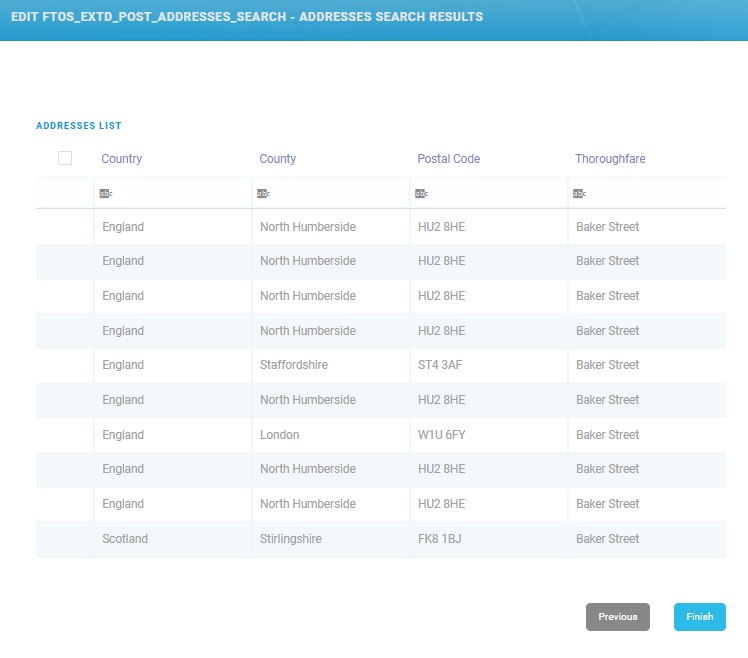
| Field | Required | Type | Description |
|---|---|---|---|
| Country | No | No | Displays the country from the address. |
| County | No | No | Displays the county from the address. |
| Postal Code | No | No | Display's the postal code from the address. |
| Thoroughfare | No | No | Displays the main street or avenue from the address. |
7. Click the Finish button. The Search Lexis Nexis List page is displayed.
To make changes to the search, click the Previous button to go back to the Add FTOS_EXTD_POST_Addresses_Search- Addresses Search page.
3 Additional Address Data
8. Double-click on the wanted record from the results list to view additional information. The Edit FTOS_EXTD_POST_Addresses page opens displaying the following additional information:
In the Edit FTOS_EXTD_POST_Addresses page, information can be added or edited, depending on the case.
| Field | Required | Type | Description |
|---|---|---|---|
| Administrative County | No | Text | The current administrative county to which the postcode has been assigned. |
| Building Name | No | Text | The building name. |
| Building Number | No | Text | The building number. |
| Country | No | Text | The country to which the postcode belongs to. Possible values are
|
| County | No | Text | The county from the address. |
| Delivery Point Suffix | No | Text | A unique Royal Mail two-character code (the first numeric and the second alphabetical), which, when added to the postcode, it enables each live delivery point to be uniquely identified. |
| Department Name | No | Text | Used to supplment Organisation Name to identify a department within the organisation. |
| Dependant Locality | No | Text | The dependenat locality of the address. |
| Dependant Thoroughfare | No | Text | When a thoroughfare name is used twice in the same Post Town, the dependant thoroughfare is added to uniquely identify a delivery point. |
| Administrative District | No | Text | The administrative district. |
| Double Dependant Locality | No | Text | Used to supplement the dependant locality, |
| Eastings | No | Text | Eastings reference using the Ordnance Survey National Grid reference system. |
| Latitude | No | Text | The latitude of the postcode (WGS84/ETRS89) |
| Address Line One | No | Text | The first address Line. Often contains premise and thoroughfare information. |
| Address Line Two | No | Text | The second address Line. Often contains thoroughfare and locality information. |
| Address Line Three | No | Text | The third address line. |
| Longitude | No | Text | The longitude of the postcode (WGS84/ETRS89). |
| Name | No | Text | The name of the address. |
| Latitude | No | Text | The latitude of the postcode (WGS84/ETRS89) |
| Organisation Name | No | Text | Name of the organisation registered at this address. |
| Postal Code Search Lookup ID | No | Text | The postal code ssearch lLookup ID. |
| PO Box number | No | Text | The PO Box number. |
| Postal County | No | Text | Postal counties were used for the distribution of mail before the Postcode system was introduced in the 1970s. The Former Postal County was the Administrative County at the time. |
| Postal Code | No | Text | Correctly formatted postcode. |
| Postcode Inward Code | No | Text | The second part of a postcode is known as the inward Code. e.g. The inward code of ID1 1QD is 1QD. |
| Postcode Outward Code | No | Text | The first part of a postcode is known as the outward code. e.g. The outward code of ID1 1QD is ID1. |
| Postcode Type | No | Text | It can only take the values "S" or "L" indicating small or large respectively. |
| Post Town | No | Text | Post Town is mandatory for delivery of mail to a delivery point. This is not necessarily the nearest town geographically, but a routing instruction to the Royal Mail delivery office sorting mail for that delivery point. |
| Premise | No | Text | Number to identify premise on a thoroughfare or dependant thoroughfare |
| Sub Building Name | No | Text | When a premise is split into individual units such as flats, apartments or business units. |
| Small User Organisation Indicator | No | Text | Small User Organisation Indicator can have the values "Y" or space. A value of "Y" indicates that a Small User Organisation is present at this address. |
| Thoroughfare | No | Text | Also known as the street or road name. In general each Thoroughfare Name will have a separate Postcode. Longer Thoroughfares with high number ranges often have multiple Postcodes covering the entire length of the road, with breaks at suitable points e.g. junctions or natural breaks in the road. |
| Traditional County | No | Text | Traditional counties are provided by the Association of British Counties. It’s historical data, and can date from the 1800s. |
| Unique Delivery Point Reference Number | No | Text | The unique delivery point reference number. |
| Multiple Residence Unique ID | No | Text | UMPRNs are a unique numeric code for any Multiple Residence household on the optional Multiple Residence dataset |
| Unique Property Reference Number | No | Text | Unique Property Reference Number is maintained by the Ordnance Survey (OS). Local governments in the UK have allocated a unique number for each land or property. |
| Administrative Ward | No | Text | The current administrative/electoral area to which the postcode has been assigned. |
9. At the top-right corner of the screen, click the Save and Close button. The EDIT FTOS_EXTD_POST_Addreses_search - Addresses Search Results displays.