Video Streaming Settings

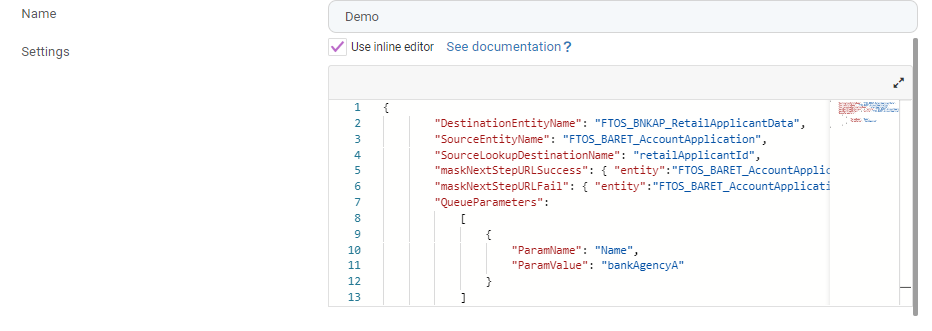
The Video Streaming settings are defined in JSON format as key-value pairs. The following settings are available:

Setting JSON Key Description
Workflow entity SourceEntityName Name of the entity on which you created the user journey.
Populated entity DestinationEntityName Name of the entity that is populated with the data returned by video streaming.
Name SourceLookupDestinationName Name of the SourceEntityName lookup key that points to DestinationEntityName. If they are the same entity, enter the primary key.


use_EU_proxy

If set to True, video streaming is done through Vonage.

  QueueParameters Defines a video streaming queue. Select a video queue either by ParamName and values, ParamValue:
  • ParamName – the attribute from FTOS_DFP_QUEUE that will identify the process queue
  • ParamValue - the value stocked on the attribute above that will unique identify the queue
For example, if you want to have all video calls in a queue, then the Queue Parameters will be VideoQ (or any other name).
If you want to have video calls coming from a flow which has this automation processor, to be added to a VIPQ, then set the Queue Parameters VIPQ and the video calls will enter this queue instead of the generic one, which in this case is VideoQ.
Redirect in case of success maskNextStepUrlSuccess Location in the user interface where the user is redirected after a successful video streaming process:
  • entity – Entity name.
  • form – Form name of the above entity.
  • section – Optional parameter for the section name of the above form.
The section can be specified using the name of the section or the section’s number. Example "section": "Personal Data" and "section": "1" are both valid.
Redirect in case of failure maskNextStepUrlFail Location in the user interface where the user is redirected If the process did not successfully pass:
  • entity – Entity name.
  • form – Form name of the above entity.
  • section – Optional parameter for the section name of the above form.
The section can be specified using the name of the section or the section’s number. Example "section": "Current Account" and "section": "4" are both valid.
 

The Video Streaming processor does not have mappings because the operator decides if the application is approved or not, not a value stored in an attribute in the source entity.

Examples