Computer Vision Use Case Scenario
This scenario covers an onboarding form driven flow that collects applicant data by scanning a proof-of-identity document, then saves it to the database.
OCR Option Set
Create an option set called typeOCR for the types of documents you wish to be able to scan. For this example, we have used the following options set items:
| Option Set Item | Description |
|---|---|
| Standard | Government-issued IDs |
| Passport | Passports |
| DrivingLicense | Driving licenses |
| VIC | Vehicle identity cards |
City Type Option Set
Create an option set called FTOS_BNK_CityType for the types of cities available for the applicants' addresses. For this example, we have used the following options set items: Village, Township, City, Municipality.
Data Model
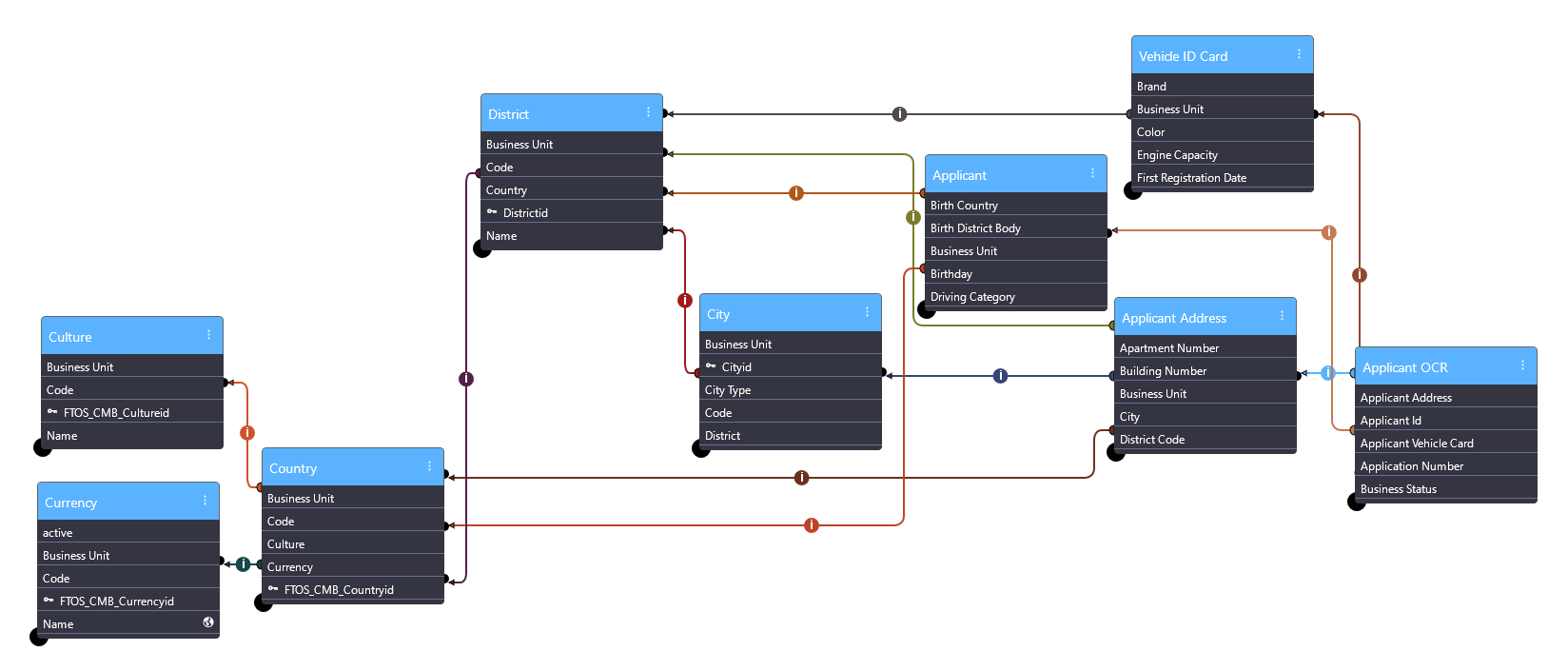
The data model is built around an OCR entity that uses business entity extensions to temporarily store the data collected during the applicant's onboarding flow, then distributes it to the relevant entities in the database for long term storage.
 Culture Entity
This entity stores the various cultures that countries issuing the scanned proof-of-identity documents belongs to. You can manually populate it with the desired culture codes based on your business specifications.
Create a business entity called FTOS_CMB_Culture with the following attributes:
| Attribute Name | Attribute Type |
|---|---|
| name | Primary Attribute |
| code | Text |
Currency Entity
This entity stores the various currencies used for the countries that issue the scanned proof-of-identity documents. You can manually populate it with the desired currency codes based on your business specifications.
Create a business entity called FTOS_CMB_Currency with the following attributes:
| Attribute Name | Attribute Type | Notes |
|---|---|---|
| code | Primary Attribute | |
| symbol | Text | |
| name | Text |
Country Entity
This entity stores valid issuing countries for the proof-of-identity document. You can manually populate it with the desired countries based on your business specifications.
Create a business entity called FTOS_CMB_Country with the following attributes:
| Attribute Name | Attribute Type | Notes |
|---|---|---|
| name | Primary Attribute | |
| cultureId | Lookup | Lookup to the Culture Entity. |
| currencyId | Lookup | Lookup to the Currency Entity. |
| code | Text | Country code. |
District Entity
This entity is used to break down the countries into smaller administrative units such as counties or states if business requirements necessitate it.
Create a business entity called District with the following attributes:
| Attribute Name | Attribute Type | Notes |
|---|---|---|
| Name | Primary Attribute | |
| Code | Text | |
| CountryId | Lookup | Lookup to the Country Entity. |
City Entity
This entity stores the information about the cities available for the applicants' addresses. You can manually populate it with the desired cities based on your business specifications.
Create a business entity called City with the following attributes:
| Attribute Name | Attribute Type | Notes |
|---|---|---|
| name | Primary Attribute | |
| Code | Text | |
| DistrictId | Lookup | Lookup to the District Entity. |
| Name | Text | |
| zipCode | Text | |
| cityTypeId | Option Set | Select the City Type Option Set you created earlier. |
Applicant Data Entity
This entity stores all the applicants' personal information collected using the onboarding flows.
Create a business entity called FTOS_Test_OCR_Applicant with the following attributes:
| Attribute Name | Attribute Type | Notes |
|---|---|---|
| name | Primary Attribute | |
| firstName | Text | |
| lastName | Text | |
| pictureOcr | File | |
| IdCardSeries | Text | |
| PIN | Text | |
| dateOfBirth | Date | |
| birthCountry | Text | |
| nationality | Text | |
| IdIssueInstitution | Text | |
| IdIssueDate | Date | |
| IdExpirationDate | Date | |
| gender | Option Set | Create an option set called Gender Type with the Male and Female option set items. |
| Text | ||
| phone | Text | |
| IssuingCountry | Lookup | Lookup to the Country Entity. |
| BirthDistrictBody | Lookup | Lookup to the District Entity |
| DrivingLicenseNo | Text | |
| DrivingCategory | Text |
Applicant Addresses Entity
This entity stores all the applicants' addresses collected using the onboarding flows. Since an applicant can have multiple addresses, they are stored in a separate entity and each address is linked to its parent applicant record in the related Applicant Data Entity.
Create a business entity called FTOS_Test_OCR_ApplicantAdress with the following attributes:
| Attribute Name | Attribute Type | Notes |
|---|---|---|
| name | Primary Attribute | |
| fullAddress | Text | |
| City | Lookup | Lookup to the City Entity. |
| streetType | Text | |
| StreetNo | Text | |
| BuildingNo | Text | |
| Stairway | Text | |
| FloorNo | Text | |
| ApartmentNo | Text | |
| StreetName | Text | |
| DistrictCode | Lookup | Lookup to the District Entity. |
| IssuingCountry | Lookup | Lookup to the Country Entity. |
Vehicle ID Card Entity
This entity stores the vehicle identity card information collected during the onboarding flows.
Create a business entity called FTOS_Test_OCR_ApplicantVIC with the following attributes:
| Attribute Name | Attribute Type | Notes |
|---|---|---|
| IdentityCardNumber | Primary Attribute | |
| PlateNumber | Text | |
| Type | Text | |
| VehicleTypeDescription | Text | |
| VehicleTypeCategory | Text | |
| Brand | Text | |
| Series | Text | |
| SeriesVariant | Text | |
| SeriesVersion | Text | |
| Model | Text | |
| VehicleidentificationNumber | Text | |
| OwnerIsCompany | Bool | |
| FirstRegistrtationDate | Date | |
| RegisteredCounty | Lookup | Lookup to the District Entity. |
| MaxAllowedMass | Numeric | |
| VehicleWeight | Numeric | |
| RegistrationDate | Date | |
| EngineCapacity | Numeric | |
| Power | Numeric | |
| FuelType | Text | |
| Color | Text | |
| NumberOfSeats | Text | |
| NumberOfStandingSeats | Text |
OCR Entity
This is the base entity of the onboarding form driven flow. It uses virtual attributes to collect personal data from the applicants that go through the flow, then populates the corresponding entities in the related data extensions for long term storage (the Applicant Data Entity, Applicant Addresses Entity, and Vehicle ID Card Entity).
Create the OCR entity
Create a business entity called FTOS_Test_OCR with the following attributes:
| Attribute Name | Attribute Type | Notes |
|---|---|---|
| applicationNo | Primary Attribute | |
| ocrType | Option Set | Select the OCR Option Set you created earlier. |
| applicantId | Lookup | Lookup to the Applicant Data Entity. |
| applicantAddress | Lookup | Lookup to the Applicant Addresses Entity. |
| applicantVehicleCard | Lookup | Lookup to the Vehicle ID Card Entity. |
Create the applicant data extension
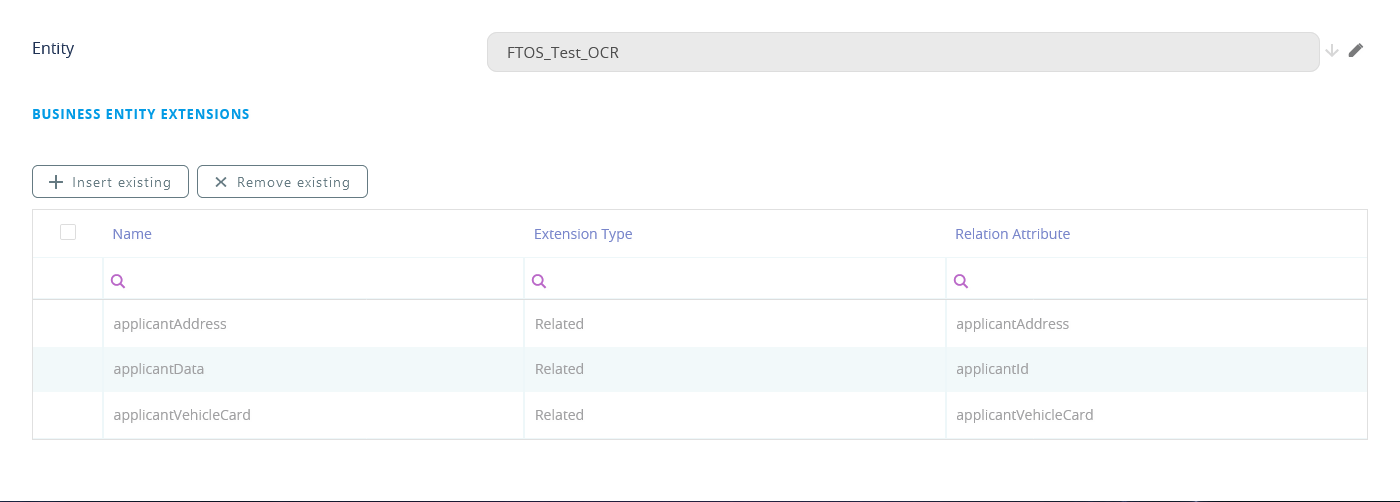
- Create a related business entity extension named applicantData based on the applicantId lookup attribute.
- Make sure you tick the Is owner for relation checkbox.
- Add virtual attributes for the following related attributes: birthCountry, BirthDistrictBody, dateOfBirth, DrivingCategory, DrivingLicenceNo, email, firstName, gender, IdCardSeries, IdExpirationDate, IdIssueDate, IdIssueInstitution, IssuingCountry, lastName, name, nationality, phone, pictureOcr, PIN, and placeOfBirth.
Create the applicant addresses extension
- Create a related business entity extension named applicantAddress based on the applicantAddress lookup attribute.
- Make sure you tick the Is owner for relation checkbox.
- Add virtual attributes for the following related attributes: ApartmentNo, BuildingNo, City, DistrictCode, FloorNo, fullAddress, IssuingCountry, Stairway, StreetName, StreetNo, and streetType.
Create the vehicle ID card extension
- Create a related business entity extension named applicantVehicleCard based on the applicantVehicleCard lookup attribute.
- Make sure you tick the Is owner for relation checkbox.
- Add virtual attributes for the following related attributes: Brand, Color, EngineCapacity, FirstRegistrationDate, FuelType, IdentityCardNumber, MaxAllowedMass, Model, NumberOfSeats, NumberOfStandingSeats, OwnerIsCompany, PlateNumber, Power, RegistrationDate, Series, SeriesVariant, SeriesVersion, Type, VehicleIdentificationNumber, VehicleTypeCategory, VehicleTypeDescription, VehicleWeight.
Set up a business workflow to track the OCR status
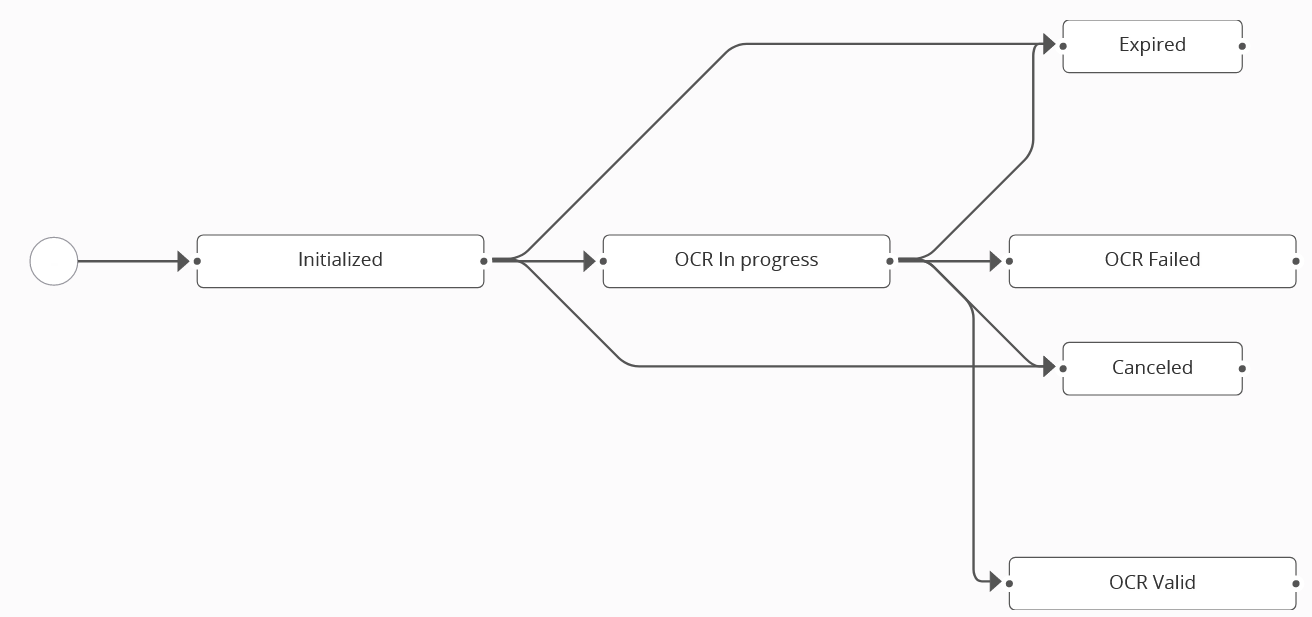
Create a business workflow called FTOS_Test_Ocr that tracks the OCR status and assign it to the FTOS_Test_OCR entity. Set the flow states and transitions based on the figure below:
OCR Flow Settings
Set Up a Computer Vision Automation Processor called FTOS_Test_OCR with processor settings for each of the OCR Option Set items you have set up:
FTOS_Test_OCR_Standard
Typical processor settings for government-issued IDs.
Settings
{
   "SourceEntityName":"FTOS_Test_OCR",
   "Entities":[
      {
         "DestinationEntityName":"FTOS_Test_OCR_Applicant",
         "SourceEntityName":"FTOS_Test_OCR",
         "SourceLookupDestinationName":"applicantId"
      },
      {
         "DestinationEntityName":"FTOS_Test_OCR_ApplicantAdress",
         "SourceEntityName":"FTOS_Test_OCR",
         "SourceLookupDestinationName":"applicantAddress"
      }
   ],
   "ContextForm" : "FTOS_Test_Processors_UserJourney",
   "WaitUserConfirmation" : false,
   "ShowUploadPhotoButton" : true,
   "ShowTakePictureButton" : true,
   "RegisterFaceFromOCR" : false,
   "SessionExpiredMins" : 5,
   "RotateImage" : true,
   "CropImage" : false,
   "MaxRetry":5,
   "businessStatusSessionExpired": true,
   "OptionSets":[
      {
         "OptionSetName":"Gender Type",
         "MappingName":"Sex",
         "OptionSetItems":{
            "M":"Male",
            "F":"Female"
         }
      }
   ],
   "LookupEntities":[
      {
         "MappingName":"DistrictCode",
         "EntityName":"District",
         "AttributeKey":"Code"
      },
      {
         "MappingName":"BirthDistrictBody",
         "EntityName":"District",
         "AttributeKey":"Code"
      },
      {
         "MappingName":"IssuingCountry",
         "EntityName":"FTOS_CMB_Country",
         "AttributeKey":"code"
      },
      {
         "MappingName":"City",
         "EntityName":"City",
         "AttributeKey":"Name",
         "Parent":{
            "AttributeParentKey":"DistrictId",
            "MappingParentName":"DistrictCode"
         }
      }
   ],
   "DocumentSettings": {
         "DocumentType":"IdentityCard",
         "Country":"RO",
         "Provider":"Azure",
         "Validations":"V01,V05,V06,V07,V08,V10",
         "RequiredFields": ["LastNameBody", "GivenNameBody", "DocumentNumberBody", "PersonalNumberBody", "BirthDateBody", "Address", "DocumentNumber", "CardType", "ProcessedPage"],
         "BirthdayValidation": true,
         "PINValidation": true
    },
   "maskNextStepURLSuccess":{
      "entity":"FTOS_Test_OCR",
      "form":"FTOS_Test_OcrFDF",
      "section":"Success"
   },
   "maskNextStepURLFail":{
      "entity":"FTOS_Test_OCR",
      "form":"FTOS_Test_OcrFDF",
      "section":"Fail"
   },
   "maskNextStepURLFailSessionExpired":{
      "entity":"FTOS_Test_OCR",
      "form":"FTOS_Test_OcrFDF",
      "section":"Expired"
   },
   "businessStatusSuccess":"OCR Valid",
   "businessStatusFail":"OCR Failed"
}
Mappings
{
    "PictureAttribute": "pictureOcr",
    "LastName": "lastName",
    "GivenName": "firstName",
    "DocumentNumber": "IdCardSeries",
    "StreetType": "streetType",
    "PersonalNumber": "PIN",
    "BirthDate": "dateOfBirth",
    "PlaceOfBirthBody": "placeOfBirth",
    "BirthCountryBody": "birthCountry",
    "Address": "fullAddress",
    "Sex": "gender",
    "Nationality": "nationality",
    "Street": "StreetName",
    "StreetNo": "StreetNo",
    "Storey": "FloorNo",
    "Stairway": "Stairway",
    "ApartmentNo": "ApartmentNo",
    "ApHouse": "BuildingNo",
    "IssuedBy": "IdIssueInstitution",
    "IssuedAt": "IdIssueDate",
    "IssuedUntil": "IdExpirationDate",
    "IssuingCountry": "IssuingCountry",
    "DistrictCode": "DistrictCode",
    "City": "City",
    "BirthDistrictBody": "BirthDistrictBody"
}Typical processor settings for passports.
Settings
{
   "SourceEntityName":"FTOS_Test_OCR",
   "Entities":[
      {
         "DestinationEntityName":"FTOS_Test_OCR_Applicant",
         "SourceEntityName":"FTOS_Test_OCR",
         "SourceLookupDestinationName":"applicantId"
      }
   ],
   "ContextForm" : "FTOS_Test_Processors_UserJourney",
   "WaitUserConfirmation" : false,
   "ShowUploadPhotoButton" : true,
   "ShowTakePictureButton" : true,
   "RegisterFaceFromOCR" : false,
   "SessionExpiredMins" : 15,
   "RotateImage" : true,
   "CropImage" : false,
   "MaxRetry":5,
   "businessStatusSessionExpired": true,
   "OptionSets":[
      {
         "OptionSetName":"Gender Type",
         "MappingName":"Sex",
         "OptionSetItems":{
            "M":"Male",
            "F":"Female"
         }
      }
   ],
   "LookupEntities":[
      {
         "MappingName":"Country",
         "EntityName":"FTOS_CMB_Country",
         "AttributeKey":"code"
      }
   ],
   "DocumentSettings": {
         "DocumentType":"Passport",
         "Provider":"Azure",
         "Validations":"V01,V05,V06,V07,V10",
         "RequiredFields": ["PersonalNumberBody", "DocumentNumberBody", "LastNameBody", "GivenNameBody", "NationalityBody", "PlaceOfBirthBody", "BirthDateBody", "SexBody"]
    },
   "maskNextStepURLSuccess":{
      "entity":"FTOS_Test_OCR",
      "form":"FTOS_Test_OcrFDF",
      "section":"Success"
   },
   "maskNextStepURLFail":{
      "entity":"FTOS_Test_OCR",
      "form":"FTOS_Test_OcrFDF",
      "section":"Fail"
   },
   "maskNextStepURLFailSessionExpired":{
      "entity":"FTOS_Test_OCR",
      "form":"FTOS_Test_OcrFDF",
      "section":"Expired"
   },
   "businessStatusSuccess":"OCR Valid",
   "businessStatusFail":"OCR Failed"
}
Mappings
{
    "PictureAttribute": "pictureOcr",
    "LastName": "lastName",
    "GivenName": "firstName",
    "DocumentNumber": "IdCardSeries",
    "PersonalNumber": "PIN",
    "BirthDate": "dateOfBirth",
    "Sex": "gender",
    "Nationality": "nationality",
    "IssuedBy": "IdIssueInstitution",
    "IssuedAt": "IdIssueDate",
    "IssuedUntil": "IdExpirationDate",
    "Country": "IssuingCountry"
}Typical processor settings for driving licenses.
Settings
{
   "SourceEntityName":"FTOS_Test_OCR",
   "Entities":[
      {
         "DestinationEntityName":"FTOS_Test_OCR_Applicant",
         "SourceEntityName":"FTOS_Test_OCR",
         "SourceLookupDestinationName":"applicantId"
      }
   ],
   "ContextForm" : "FTOS_Test_Processors_UserJourney",
   "WaitUserConfirmation" : false,
   "ShowUploadPhotoButton" : true,
   "ShowTakePictureButton" : true,
   "RegisterFaceFromOCR" : false,
   "SessionExpiredMins" : 15,
   "RotateImage" : true,
   "CropImage" : false,
   "MaxRetry":5,
   "businessStatusSessionExpired": true,
   "OptionSets":[],
   "LookupEntities":[],
   "DocumentSettings": {
         "DocumentType":"DrivingLicence",
         "Country":"RO",
         "Provider":"Azure",
         "Validations":"",
         "RequiredFields": ["IssuedAt", "IssuedUntil", "IssuedBy", "PIN", "DrivingLicenceNo", "DrivingCategory"]
    },
   "maskNextStepURLSuccess":{
      "entity":"FTOS_Test_OCR",
      "form":"FTOS_Test_OcrFDF",
      "section":"Success"
   },
   "maskNextStepURLFail":{
      "entity":"FTOS_Test_OCR",
      "form":"FTOS_Test_OcrFDF",
      "section":"Fail"
   },
   "maskNextStepURLFailSessionExpired":{
      "entity":"FTOS_Test_OCR",
      "form":"FTOS_Test_OcrFDF",
      "section":"Expired"
   },
   "businessStatusSuccess":"OCR Valid",
   "businessStatusFail":"OCR Failed"
}
Mappings
{
    "PictureAttribute": "pictureOcr",
    "LastName": "lastName",
    "GivenName": "firstName",
    "BirthDate": "dateOfBirth",
    "PlaceOfBirth": "placeOfBirth",
    "PIN": "PIN",
    "IssuedBy": "IdIssueInstitution",
    "IssuedAt": "IdIssueDate",
    "IssuedUntil": "IdExpirationDate",
    "DrivingLicenceNo": "DrivingLicenceNo",
    "DrivingCategory": "DrivingCategory"
}Typical processor settings for vehicle identity cards.
Settings
{
   "SourceEntityName":"FTOS_Test_OCR",
   "Entities":[
      {
         "DestinationEntityName":"FTOS_Test_OCR_Applicant",
         "SourceEntityName":"FTOS_Test_OCR",
         "SourceLookupDestinationName":"applicantId"
      },
      {
         "DestinationEntityName":"FTOS_Test_OCR_ApplicantAdress",
         "SourceEntityName":"FTOS_Test_OCR",
         "SourceLookupDestinationName":"applicantAddress"
      },
      {
         "DestinationEntityName":"FTOS_Test_OCR_ApplicantVIC",
         "SourceEntityName":"FTOS_Test_OCR",
         "SourceLookupDestinationName":"applicantVehicleCard"
      }
   ],
   "ContextForm" : "FTOS_Test_Processors_UserJourney",
   "WaitUserConfirmation" : false,
   "ShowUploadPhotoButton" : true,
   "ShowTakePictureButton" : true,
   "RegisterFaceFromOCR" : false,
   "SessionExpiredMins" : 15,
   "RotateImage" : true,
   "CropImage" : true,
   "MaxRetry":5,
   "businessStatusSessionExpired": true,
   "OptionSets":[
      {
         "OptionSetName":"Gender Type",
         "MappingName":"Sex",
         "OptionSetItems":{
            "M":"Male",
            "F":"Female"
         }
      }
   ],
   "LookupEntities":[
      {
         "MappingName":"RegisteredCounty",
         "EntityName":"District",
         "AttributeKey":"Code"
      },
      {
         "MappingName":"City",
         "EntityName":"City",
         "AttributeKey":"Name",
         "Parent":{
            "AttributeParentKey":"DistrictId",
            "MappingParentName":"DistrictCode"
         }
      }
   ],
   "DocumentSettings": {
         "DocumentType":"VehicleIdentityCard",
         "Country":"RO",
         "Provider":"Azure",
         "Validations":"V01,V02",
         "RequiredFields": ["IdentityCardNumber", "PlateNumber", "Brand", "Series", "SeriesVariant", "SeriesVersion", "Model", "VehicleIdentificationNumber"]
    },
   "maskNextStepURLSuccess":{
      "entity":"FTOS_Test_OCR",
      "form":"FTOS_Test_OcrFDF",
      "section":"Success"
   },
   "maskNextStepURLFail":{
      "entity":"FTOS_Test_OCR",
      "form":"FTOS_Test_OcrFDF",
      "section":"Fail"
   },
   "maskNextStepURLFailSessionExpired":{
      "entity":"FTOS_Test_OCR",
      "form":"FTOS_Test_OcrFDF",
      "section":"Expired"
   },
   "businessStatusSuccess":"OCR Valid",
   "businessStatusFail":"OCR Failed"
}
Mappings
{
    "PictureAttribute": "pictureOcr",
    "OwnerName": "lastName",
    "OwnerSurname": "firstName",
    "OwnerStreetType": "streetType",
    "OwnerFullAddress": "fullAddress",
    "OwnerStreetName": "StreetName",
    "OwnerStreetNo": "StreetNo",
    "OwnerStorey": "FloorNo",
    "OwnerStairway": "Stairway",
    "OwnerApartmentNo": "ApartmentNo",
    "OwnerApHouse": "BuildingNo",
    "IssuedBy": "IdIssueInstitution",
    "IssuedAt": "IdIssueDate",
    "IdentityCardSeries": "IdCardSeries",
    "ValidUntil": "IdExpirationDate",
    "RegisteredCounty": "DistrictCode",
    "City": "City",
    "IdentityCardNumber": "IdentityCardNumber",
    "PlateNumber": "PlateNumber",
    "Type": "Type",
    "VehicleTypeDescription": "VehicleTypeDescription",
    "VehicleTypeCategory": "VehicleTypeCategory",
    "Brand": "Brand",
    "Series": "Series",
    "SeriesVariant": "SeriesVariant",
    "SeriesVersion": "SeriesVersion",
    "Model": "Model",
    "VehicleIdentificationNumber": "VehicleIdentificationNumber",
    "OwnerIsCompany": "OwnerIsCompany",
    "FirstRegistrationDate": "FirstRegistrationDate",
    "MaxAllowedMass": "MaxAllowedMass",
    "VehicleWeight": "VehicleWeight",
    "RegistrationDate": "RegistrationDate",
    "EngineCapacity": "EngineCapacity",
    "Power": "Power",
    "FuelType": "FuelType",
    "Color": "Color",
    "NumberOfSeats": "NumberOfSeats",
    "NumberOfStandingSeats": "NumberOfStandingSeats"
}
OCR Form Driven Flow
Create an onboarding form driven flow called FTOS_Test_OcrFDF to collect the applicants' data.
Data Model
Use the OCR Entity as the base entity of the flow and include all its business entity extensions in the data model: applicantAddress, applicantData, and applicantVehicleCard.
Flow Control
Create the following entity form steps and transitions.
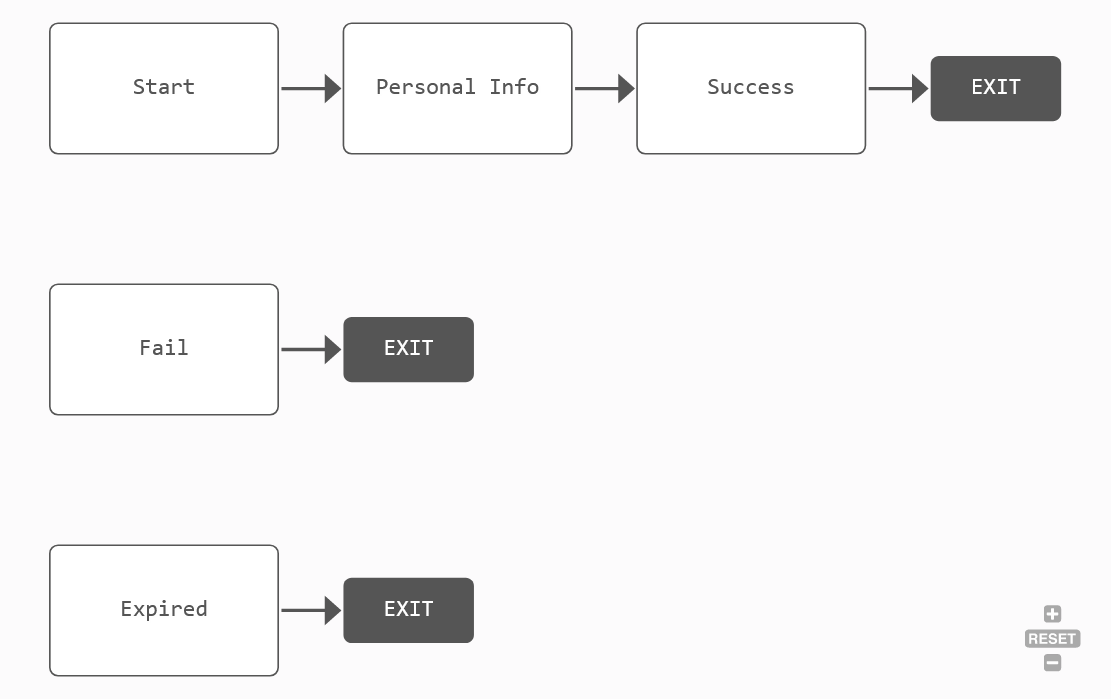
| Order | Step Name | Flow Control: Default Navigation Rule |
|---|---|---|
| 1 | Start | |
| 2 | Personal Info | |
| 3 | Success | Close Flow. Navigate to Homepage. |
| 4 | Fail | Close Flow. Navigate to Homepage. |
| 5 | Expired | Close Flow. Navigate to Homepage. |
Steps Configuration
Configure the flow steps as follows:
| Step | UI Configuration |
|---|---|
|
Start |
This is the initial step of the flow where the applicant selects the type of identity document to be scanned. In the UI, include a welcome message and the ocrType attribute. |
|
Personal Info |
This step collects applicant contact information and triggers the OCR. In the UI, include the following attributes: applicantNo, applicantId_email, applicantId_phone, and applicantId_name. In the Advanced section, add the following code in the After Section Save tab: Copy
|
|
Success |
This step displays the information collected in case of a successful OCR and allows the applicant to further edit the fields. In the UI, include the following attributes, preferably grouped into three sections:
|
|
Fail |
This step is displayed if the OCR fails. Display a fail message in the UI. |
|
Expired |
This step is displayed if the OCR session expired. Display a session expired message in the UI. |
Assign the OCR Flow Settings to the Form Driven Flow
In the form driven flow's Advanced section, in the Before Events tab, add the following code:
if (sessionStorage.getItem("B2CSessionIdParam")) {
    formData.setSaveEndpoint("FTOS_Test_SaveOnboarding");
}

formData.FlowSettings = "FTOS_Test_OCR";