Adding Business Unit Branches
Business unit branches represents a great way to set up a bank internal organizational structure. Follow these steps to add new business unit branches:
-
In FintechOS Studio, go to Security > Business Unit Branches.
-
Click the Insert button. The Add Business Unit Branch page opens..
-
Fill in the following fields:
Field Type Description Name Text The name of the branch. Unit Type Lookup The unit type of the record. Lookup to FTOS_ACC_UnitType.Parent Unit Type Lookup The parent type of the current record. Lookup to FTOS_ACC_UnitType.Status Dropdown Select one of the following statuses:
-
Inactive
-
Active
-
Draft
-
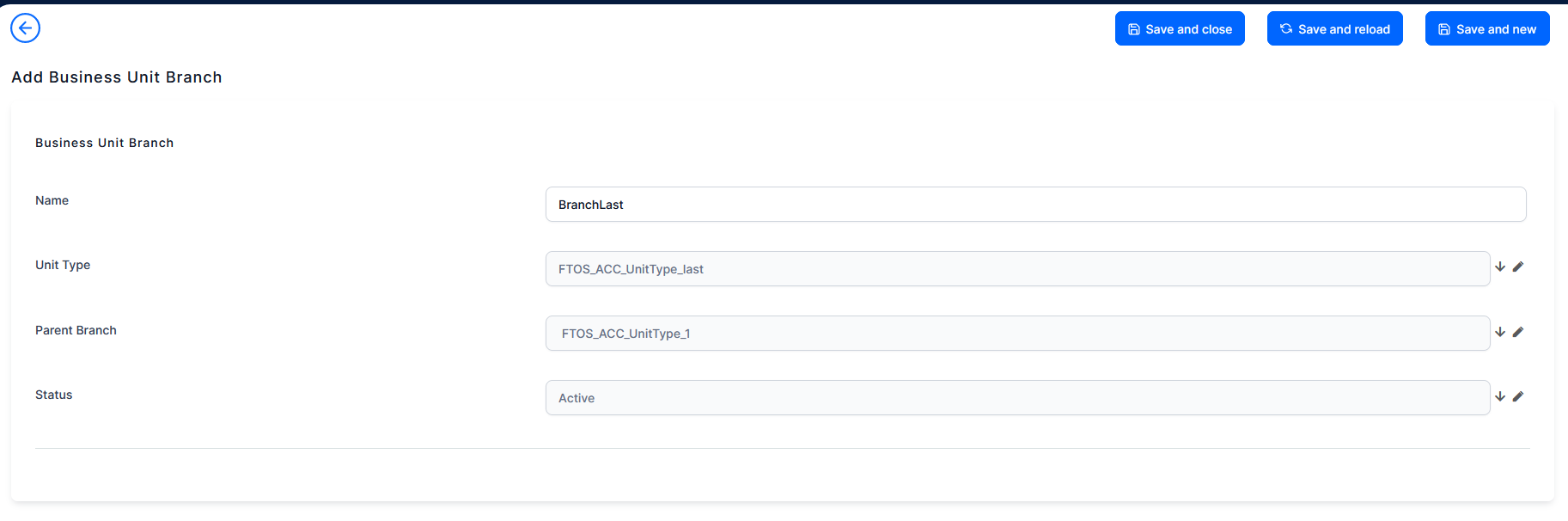
7. Click Save and reload. The Business Lines section is displayed.
8. Click the Insert existing button to add a business line or create a new one. The following options are available:
-
Corporate
-
Individuals
-
Insurance
-
WM
9. Click Save and close to return to the Business Unit Branches List page.