Getting Status Changes Notifications Using Webhooks
Webhooks are automated message sent from an application when an event is triggered. In the Onfido dashboard, webhooks need to be defined allowing you to get notifications when the applicant document check and report are completed.
Only one webhook can be created for each client account in the Onfido dashboard.
Configure the Onfido Webhooks in Onfido Dashboard
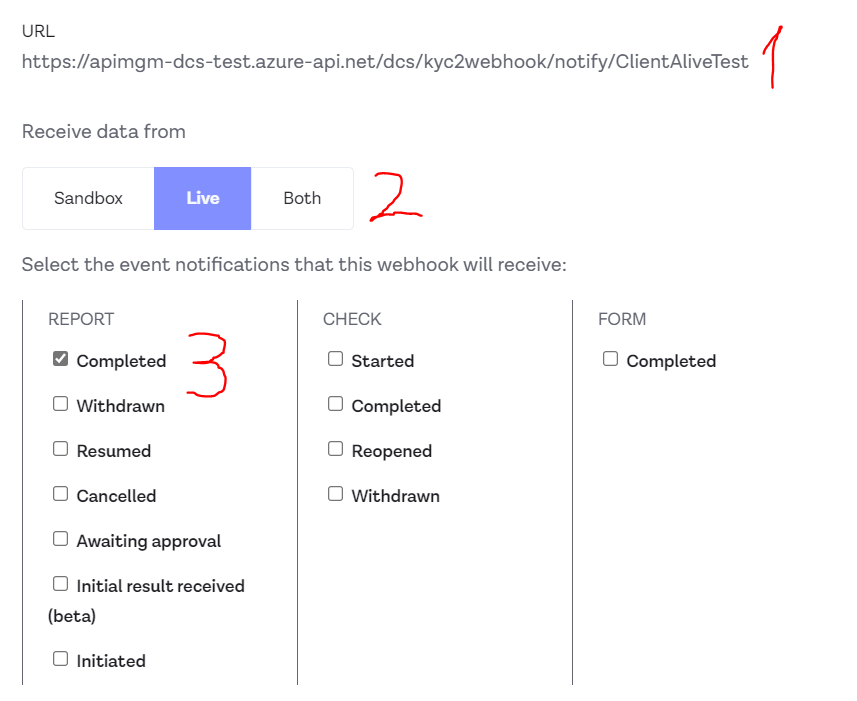
1. The URL which Onfido will call via their webhook needs to be configured using 2 parts:
a. The base API Endpoint: https://apimgm-dcs-test.azure-api.net/dcs/kyc2/webhook/notify/
b. The client’s configuration Name that matches the one in Vault (see Section Vault Configurations)
2. Receive Data From: select Live.
3. The Event for which we need to get a notification: Report - select Completed.
Webhook flow
-
User in FintechOS starts the Onfido flow > Processor calls DCS CreateApplicant > Processor calls DCS
GetSdkToken(using the receivedApplicantId). -
User in FintechOS interacts with Onfido SDK and uploads a document.
-
Processor calls DCS
StartCheck> DCS getsWebhookIdfrom Vault matching the proper FintechOS instance based onSubscriptionIdheader (See section Vault Configurations) > Calls Onfido Check (check process can last up to 5 minutes). -
Onfido Check is done > Onfido Report is being generated.
-
Onfido utilizes the URL defined in the WebhookId and calls DCS Webhook API with a Report Completed notification.
-
DCS Webhook API translates the
/{configurationName}parameter received from the URL, to identify to which FintechOS instance it coresponds (using Vault). -
DCS calls matching FintechOS instance for authentication.
-
DCS calls the matching FTOS instance and sends to it the Onfido Event (Report Completed) as JSON data.
Vault Configurations
DCS Onfido configurations are stored inside Vault inside a KV (key-value) Service, using the structure path kv/dcs/kyc-onfido. The configuration contains the following fields:
{
  "EnableSwagger": "false",
  "Onfido-ApiTokens": "[]",
  "Onfido-BaseUrl": "https://api.eu.onfido.com/v3.2",
  "serilog-file-logging": "true",
  "serilog-fileName": "logs\\trace_roll_.log",
  "serilog-flushInterval": "1s",
  "serilog-logLevel": "Debug",
  "serilog-retainedFileCount": "31",
  "serilog-rollSizeBytes": "10000000",
  "serilog-seq-apiKey": "be276e4b-37f7-473f-9e1b-f947d6a3d4c4",
  "serilog-seq-logging": "true",
  "serilog-seq-maxEventCount": "10000000",
  "serilog-seq-serverUrl": "http://localhost:5341"
}
Configuration Values
-
EnableSwagger: False (in UAT & Production), True only in Test environments.
-
Serilog fields & values: For logging purposes
-
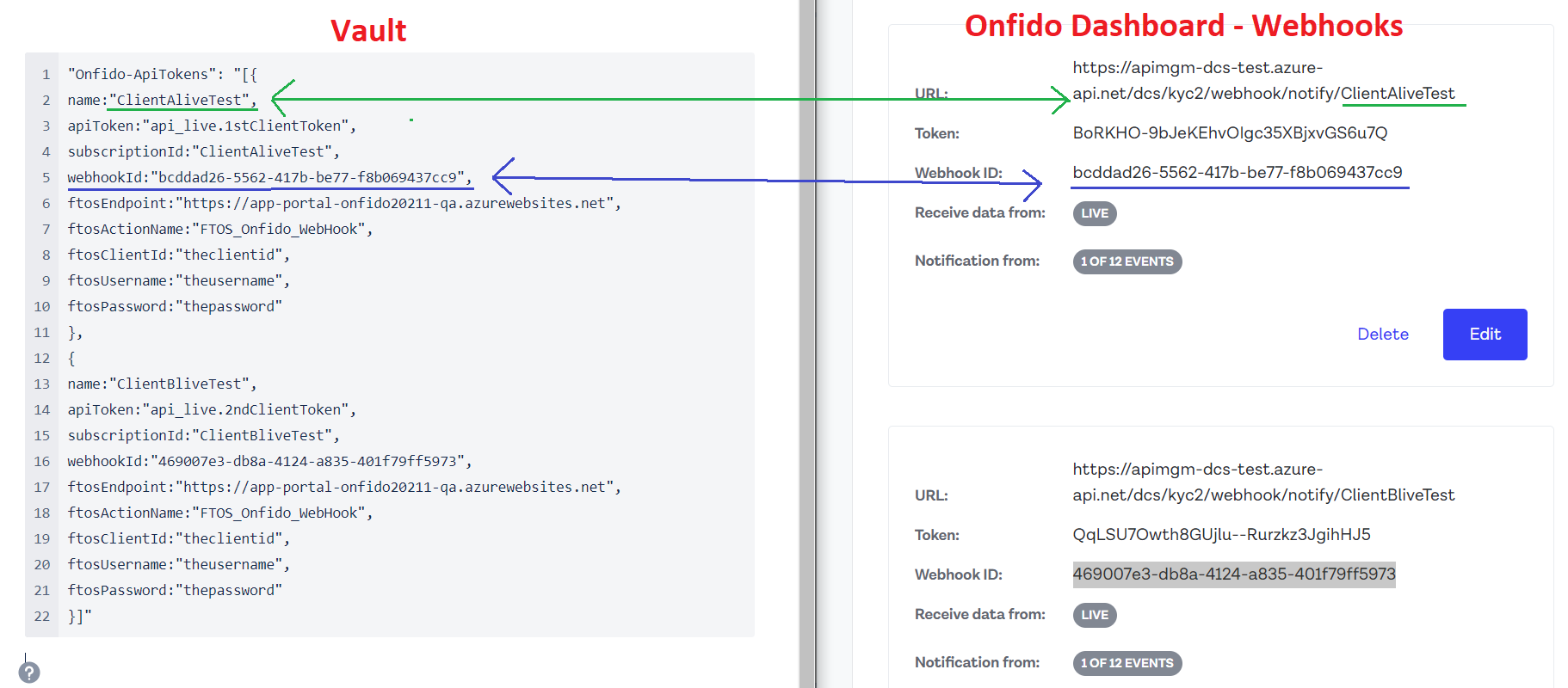
Onfido-ApiTokens: This is an array of objects; each object is a configuration for a specific client.
Onfido-ApikTokens Array
Name: Needs to be placed in Vault as route parameter of the DCS Notify URL (baseurl/{configurationName} in the Webhook created in the Onfido Dashboard).
apiToken: This needs to be placed in Vault for the per client configuration. It is generated from the Onfido Dashboard.
subscriptionId: Per client configuration, is obtained from Azure.
webhookId: The specific webhookId of the defined webhook. Obtained from the Onfido Dashboard.
ftosEndpoint: The specific Portal URL for the client’s FintechOS instance.
ftosClientId, ftosUsername, ftosPassword: Specific account for each of the FintechOS instances / implementations. Necessary for the DCS to be able to send Completed Reports back to the FintechOS instance.