Mass Changes to Contracts
The Mass change settings feature allows you to perform bulk changes to contracts with variable interest. Using this you can trigger a contract reevaluation to update the base interest rate and trigger updates to the payment schedule subsequently. You can also adjust the date when the contract reevaluation is done in accordance with the change in the base interest rate.
After configuring the parameters for mass changes, go to the Portal to perform mass changes on a number of contracts.
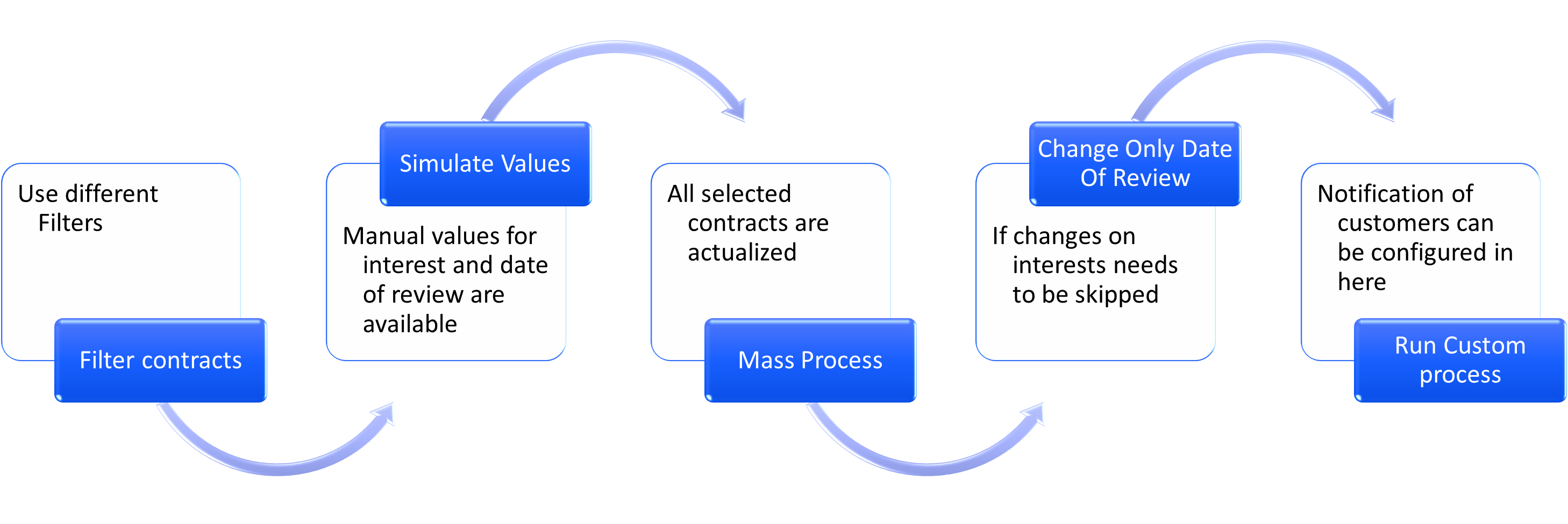
Performing Mass Changes
-
Go to the Portal and click Contract Mass Change Console in the menu.
-
Open an existing record or create a new one using the Insert button.
-
Set the Start Date and End Date for the search to pull up contracts only in this interval.
-
Click the Use Additional Filters button to open up the following filters for searching for contracts:
-
Product Type: pull up contracts with certain products.
-
Base Interest Type: only display contracts with a certain base interest type.
-
Currency: find contracts in a certain currency.
-
Include Manual Changes: display only contracts with manual changes.
-
-
Click Display Possible Manual Values to open:
-
Manual Reference Date: allows you to pick a date to overwrite the automatic reevaluation date.
-
Set Manual Review Date: allows you to set a certain day for the next contract reevaluation manually.
-
-
Tick the Set Manual Interest Rate box to set a certain interest rate to be used at reevaluation.
-
Click the Get Contract List button to pull up contracts based on the previously set filters.
-
Click Mass Simulation to perform a simulation of changes on the selected contracts from the list.
-
The Mass Process button performs the actual changes to your contracts, such as modifies the base interest rate, changes the reevaluation date, recalculates the payment schedule, etc.
-
The Change Only Review Date button only updates the review date on selected contracts.
-
The Custom Action button allows you to use a script to trigger certain actions. One use case would be sending notification emails to customers after the base interest rate was modified on their contract.