Product Admin Configuration Life Cycle and States
The four-eyes principle is applicable for all contracts in FintechOSLoan Management, meaning that a record should be approved by a second financial institution employee, with higher authorization rights. This is enabled via approval task FintechOS Platform capabilities and thus it is also a financial institution's responsibility to set proper security roles and access rights to its users, in order to make sure that the same user can't insert and also authorize the same record.
A product admin configuration record has the following business workflow statuses:
-
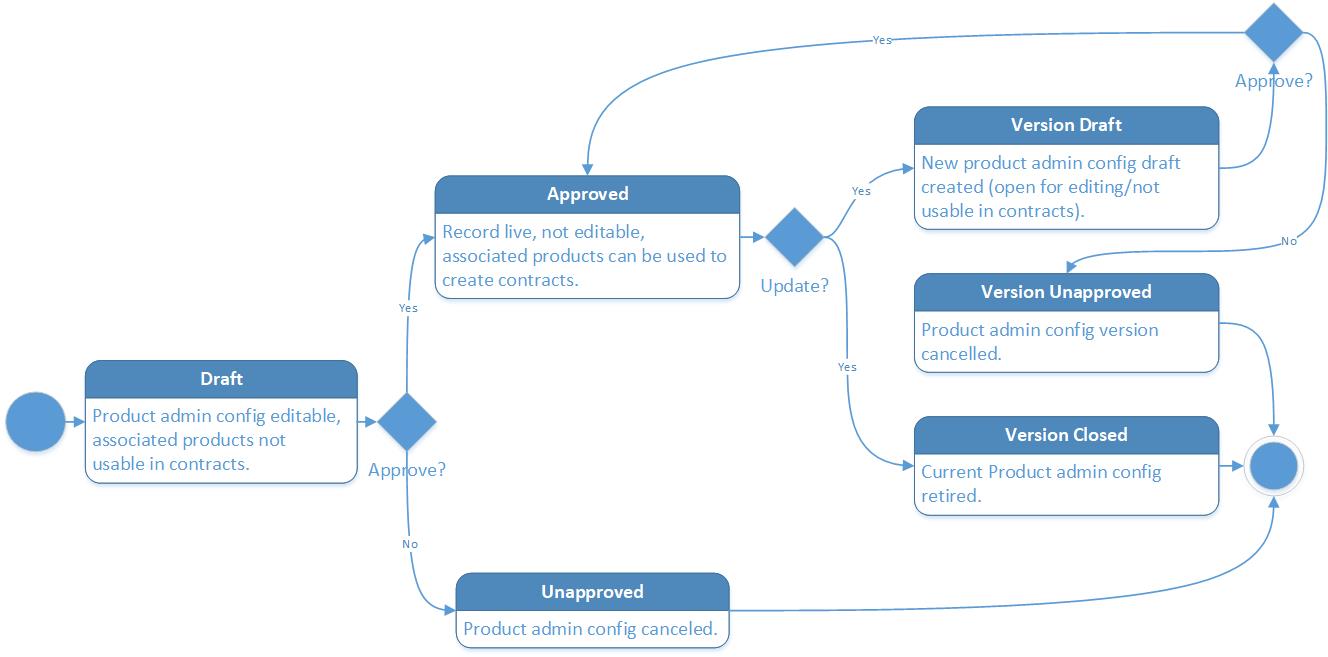
Draft - the status of a newly created product admin configuration record that was not yet sent for approval. While in this status, you can edit some fields and associate a product to it, but you can't use those products to create contracts. Send the record to approval after editing all the necessary details.
-
Approved - the status of a product admin configuration record after being authorized by a user with product admin configuration approval competencies. While in this status, you cannot edit the record's details, but you can use the associated product to create contracts. If you need to alter the product admin configuration's details, create a new version based on the current one.
-
Unapproved - the status of a product admin configuration after manually canceling it straight from the Draft status. No updates are allowed on the record.
Change the product admin configuration's status to Approved so that the product associated to it can be used to create contracts.
A new product admin configuration record is automatically created in Version Draft status each time a product associated to it is versioned. When the product in Version Draft status gets approved, the product admin configuration record is automatically transitioned to Approved status.
Product Admin Configuration Versioning
Loan Management allows you to create new versions for an existing product admin configuration record if you need to modify an existing approved record.
A product admin configuration version can have the following statuses:
-
Version Draft - the status of a newly created product admin configuration version record that was not yet sent for approval. While in this status, you can edit some fields and associate a product to it. Send the record to approval after editing all the necessary details.
-
Approved - the status of a product admin configuration version record after being authorized by a user with product admin configuration approval competencies. While in this status, you cannot edit the record's details.
-
Version Closed - the last status of a product admin configuration version, after creating another new version based on the current version. No updates are allowed on the record.
-
Version Unapproved - the status of a product admin configuration after manually canceling it straight from the Version Draft status. No updates are allowed on the record.
Changing Product Admin Configuration Statuses
You can manage a product admin configuration's life cycle by changing its status from the top right corner of the screen.
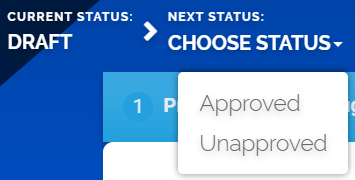
To edit an approved record, create a new version of the record using the
 button at the top right side of the Product Admin Configuration page.
The product admin configuration status transitions are illustrated below:
Note that:
- Once a record is live, its settings can no longer be modified.
- If you want to update the details of a live product admin configuration, you must create a new product admin configuration version.
- When you create a new product admin configuration version, the current version is retired and moved to history; no updates are allowed on the retired version.
- Every product admin configuration version starts in a draft state and must go through an approval process before going live.
- Only one version of a product admin configuration can be live at one time.
As a best practice, new records or new versions of existing records created on a specific day should be approved on the same day.