Business Formulas Integration
The Insurance Product Factory module integrates smoothly with the FintechOS Business Formulas solution which enables you to create your own formulas for insurance. Formulas can support various business needs and they are a mandatory prerequisite for making your Insurance Product Factory work at its full capacity.
You input your financial and non-financial data and arguments into your Formulas and, consequently, they help you with risk scoring - for example, to determine whether a property is eligible for insurance or not. In addition, Formulas generate accurate desired outputs - such as premium calculations split per insured items and handle various calculation scenarios - for example, for when premiums are configured differently for individual or group purchases.
Use Business Formulas to create all the necessary formulas for handling the premium calculations for the specified Insurance Product Items and then use the Premium Amount tab (inside a chosen product) to attach them to the product items. Similarly, use Business Formulas to create all the necessary formulas for handling the risk scoring for your Insurance Product and then use the Underwriting tab (inside a chosen product) to attach them to the product.
The Insurance Product Factory solution also allows you to test your formulas based on different scenarios that you can log onto the Test Scenarios page. Using scenarios to test your formulas helps with fine-tuning and improving the general performance of your Insurance Product.
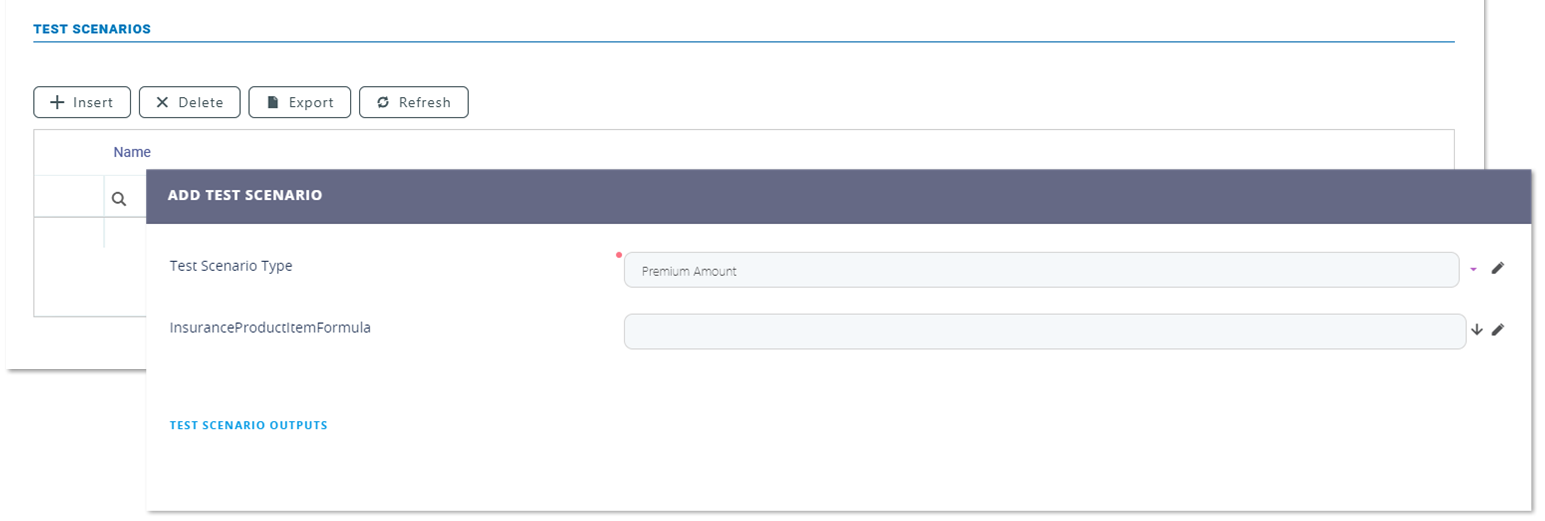
Only one formula can be attached on a specific coverage of a product.
Demo Formulas
The following formulas are included in the Import Formulas digital asset, for demo purposes:
Formula 1 - Bankassurance_UW_Formula_Final
 Formula Steps
The following are the steps used for risk scoring:
| Name | Exclude From Mapping | Master Type | SubType | CalculationType | Exection Order |
|---|---|---|---|---|---|
| ruleInsuredAmount | FALSE | Simple Type | Text | Normal | 1 |
| ruleSeismicZone | FALSE | Simple Type | Text | Normal | 2 |
| uwDecision | FALSE | Simple Type | Text | Normal | 3 |
Formula Input
The following are the arguments used as input for the Bankassurance_UW_Formula_Final calculations: insuredAmount and seismicZone.
Data sets
The following data sets are used for calculations:
|
Data Set Name |
Data Set Display Name |
Data Set Discriminants |
Data Set Values |
|---|---|---|---|
| BA_UW_SeismicZone | Bankassurance UW Seismic Zone | SeismicZone | BA_UW_SeismicZone |
| BA_UW_InsuredAmount | Bankassurance_UW_InsuredAmount | InsuredAmount | BA_UW_InsuredAmount |
| BA_UW_Surrender | Bankassurance UW Surrender | hasSurrender | BA_UW_Surrender |
Formula 2 - EmbededBankAssurancePremiumAmountFormula
Formula Steps
The following are the steps used for premium calculation, with this formula:
| Name | Exclude From Mapping | Master Type | SubType | CalculationType | Exection Order |
|---|---|---|---|---|---|
| risksCalculatedPrices | FALSE | Collection | Whole Number | Iteration | 1 |
| baseQuotation | FALSE | Simple Type | Decimal | Normal | 2 |
| premiumAmount | FALSE | Simple Type | Decimal | Normal | 3 |
Formula Input
The following are the arguments used as input for the formula calculations: propertyConstructionYear, propertyInsuredAmount, and risks.
Data sets
The following data sets are used for calculations:
|
Data Set Name |
Data Set Display Name |
Data Set Discriminants |
Data Set Values |
|---|---|---|---|
| BankAssurance_RisksPrices | BankAssurance Risks Prices | ConstructionYear; RiskName | BankAssurance_RisksPrices |
Formula 3 - HomeServiceBankAssurancePremiumAmountFormula
Formula Steps
The following are the steps used for premium calculation, with this formula:
| Name | Exclude From Mapping | Master Type | SubType | CalculationType | Exection Order |
|---|---|---|---|---|---|
| coefHomeAssistancePrice | FALSE | Simple Type | Decimal | Normal | 1 |
| premiumAmount | FALSE | Simple Type | Decimal | Normal | 2 |
Formula Input
The following are the arguments used as input for the formula calculations: buildingInsuredAmount and constructionYear.
Data sets
The following data sets are used for calculations:
|
Data Set Name |
Data Set Display Name |
Data Set Discriminants |
Data Set Values |
|---|---|---|---|
| BA_HomeService_Prices | Bankassurance Home Service Prices | ConstructionYear | BA_HomeService_Prices |
Formula 4 - PA_Final_Premium
Formula Steps
The following are the steps used for premium calculation:
| Name | Exclude From Mapping | Master Type | SubType | CalculationType | Exection Order |
|---|---|---|---|---|---|
| BaseRate | FALSE | Simple Type | Decimal | Normal | 1 |
| CoefFrequency | FALSE | Simple Type | Decimal | Normal | 2 |
| CoefAge | FALSE | Simple Type | Decimal | Normal | 3 |
| CoefAmountInsuredItem | FALSE | Simple Type | Decimal | Normal | 4 |
| ItemPremiumAmount | FALSE | Simple Type | Decimal | Normal | 5 |
Formula Input
The following are the arguments used as input for the PA_Final_Premium calculations: age, coverage, frequency and sumInsured.
Data sets
The following data sets are used for calculations:
|
Data Set Name |
Data Set Display Name |
Data Set Discriminants |
Data Set Values |
|---|---|---|---|
| PA_Age | PA_Age | Age
|
Age |
| PA_AmountInsuredItem | Amount Insured Item | AmountInsured; Coverage |
AmountInsuredItem |
| PA_Base_Rate | PA_Base_Rate | Coverage
|
PA_Base_Rate |
| PA_Frequency | PA_Frequency | Frequency
|
PA_Frequency |
Formula 5 - PropertyFormula
Formula Steps
The following are the steps used for premium calculation.
| Name | Exclude From Mapping | Master Type | SubType | CalculationType | Exection Order |
|---|---|---|---|---|---|
| BaseRate | FALSE | Simple Type | Decimal | Normal | 1 |
| CoefFrequency | FALSE | Simple Type | Decimal | Normal | 2 |
| CoefAge | FALSE | Simple Type | Decimal | Normal | 3 |
| CoefAmountInsuredItem | FALSE | Simple Type | Decimal | Normal | 4 |
| ItemPremiumAmount | FALSE | Simple Type | Decimal | Normal | 5 |
Formula Input
The following are the arguments used as input for the PA_Final_Premium calculations: age, coverage, frequency and sumInsured.
Data sets
The following data sets are used for calculations:
|
Data Set Name |
Data Set Display Name |
Data Set Discriminants |
Data Set Values |
|---|---|---|---|
| HH_BaseRate | HH_BaseRate | Coverage | HH_BaseRate |
| HH_BuidingSumInsured | HH_BuidingSumInsured | Coverage; InsuredAmount | HH_BuidingSumInsured |
| HH_BuildingType | HH_BuildingType | BuildingType; Coverage | HH_BuildingType |
| HH_Construction_Year | Construction Year | Construction Year; Coverage | HH_Construction_Year |
| HH_Frequency | HH_Frequency | Frequency | Frequency |
| HH_ResistanceStructure | HH_ResistanceStructure | Coverage; Resistance Structure | HH_ResistanceStructure |
| HH_UsageType | Usage Type | Coverage; Usage Type | HH_UsageType |
Formula 6 - PropertyFormula_UW
Formula Steps
The following are the steps used for premium calculation.
| Name | Exclude From Mapping | Master Type | SubType | CalculationType | Exection Order |
|---|---|---|---|---|---|
| BaseRate | FALSE | Simple Type | Decimal | Normal | 1 |
| CoefFrequency | FALSE | Simple Type | Decimal | Normal | 2 |
| CoefAge | FALSE | Simple Type | Decimal | Normal | 3 |
| CoefAmountInsuredItem | FALSE | Simple Type | Decimal | Normal | 4 |
| ItemPremiumAmount | FALSE | Simple Type | Decimal | Normal | 5 |
Formula Input
The following are the arguments used as input for the PA_Final_Premium calculations: age, coverage, frequency and sumInsured.
Data sets
The following data sets are used for calculations:
|
Data Set Name |
Data Set Display Name |
Data Set Discriminants |
Data Set Values |
|---|---|---|---|
| HH_UW_BuildingSumInsured | HH_UW_BuildingSumInsured | Coverage; InsuredAmount | HH_UW_BuildingSumInsured |
| HH_UW_ConstructionYear | HH_UW_ConstructionYear | ConstructionYear | HH_UW_ConstructionYear |
| HH_UW_ResistanceStructure | HH_UW_ResistanceStructure | ResistanceStructure | HH_UW_ResistanceStructure |
| HH_UW_UsageType | HH_UW_UsageType | UsageType | HH_UW_UsageType |
For more details about configuring formulas, see the Business Formulas documentation and this Risk Scoring tutorial.