Leasings
A lease is a written agreement specifying the conditions under which a lessor accepts to let out a property to be used by a lessee. The agreement promises the lessee use of the property for an agreed length of time while the owner is assured consistent payment over the agreed period.
To manage banking products:
- Log into Innovation Studio in Developer mode.
- Click the main menu icon at the top left corner.
- In the main menu, click Product Factory.
- Click Banking Products to open the Banking Products List page.

In the Banking Products List page, you can:
- Add a new banking product by clicking the Insert button at the top right corner.
- Edit an existing banking product from the list by double clicking it.
- Delete a banking product by selecting it and clicking the Delete button at the top right corner.
Creating Leasings
To create a new banking product, click the Insert button on the top right side of the page. A new page opens, with a series of tabs that assist you in configuring the banking product:
- Main Info - The first tab requires the basic elements for the creation of a product such as product type, name, code, hierarchy and features.
- Details - This tab requires further elements that build on the first tab such as interest, payment type, top-ups, withdrawals and associated products.
- Availability - This tab determines the monetary range and the time frame when the product is available for customers.
- Dimensions - This tab displays the interests, commissions, insurances, discounts and questions valid for a product.
- Risk Formulas - In this tab, you can attach a formula that triggers calculations to determinate the eligibility of a customer, for example.
- Test Risk Formulas - Use this tab to test the formula attached above before displaying it in a digital journey.
- Documents - This tab contains all the attached documents available for a product.
- Associated Transactions - Transactions that are done to and from a banking product are found in this tab.
- History - This tab displays the versions of the product, along with workflow status and the user who modified the product.
- GL Settings - This tab contains the accounts to be used by Operational Ledger for transactions performed on contracts based on this banking product.
 Main Info
The Main Info tab requires the basic elements for the creation of a product such as name, code, image and features.
The following fields are available:
| Field | Required | Data Type | Details |
|---|---|---|---|
| Product Type | Yes | Option Set | Choose one for the following:
NOTE Your product type selection greatly influences the next steps. It is important to choose the right type of product to build. |
| External Code | No | Text | The code of the product imported from an external system, if applicable. It can have 10 characters and it is not used in the contract. |
| Banking Product Code | Yes | Text | The code of the product. It can have 10 characters and it is used in the contract. It uses a sequencer and the code of the product type. |
| Name | Yes | Text | The name of the product. |
| Class | No | Option set | This field is used to place the product in a hierarchy. For more information, see Product Hierarchy |
| Subclass | No | Option set | This field is used to place the product in a hierarchy. For more information, see Product Hierarchy |
| Category | No | Option set | This field is used to place the product in a hierarchy. For more information, see Product Hierarchy |
| Subcategory | No | Option set | This field is used to place the product in a hierarchy. For more information, see Product Hierarchy |
| Start Date | Yes | Date | The date when the product becomes available. |
| End Date | Yes | Date | The last date from when the product is available. From that date forward, the product is no longer available. |
| Benefits | No | Text area | Insert the advantages of owning the banking product. You can format the text in the text editor window. |
| Description | No | Text area | Write any description or additional text here. |
| Product Image | No | File | Insert an image representative for the product. |
| Document | No | File | Insert the document representative for the product. |
| Display Conditions | No | Text area | Insert the conditions for the applicant, e.g. age limit, annual turnover, education level, income, registration documents. |
Click the Save and Reload button at the top right corner of the page.
In the Product Features section, you can insert, delete or export features. To add a feature, click Insert and fill in the following fields:
| Field | Required | Data Type | Details |
|---|---|---|---|
| Banking Product | No | Option set | Choose the name of the product. |
| Is main feature | No | Bool | Select the checkbox if it is the major feature. |
| Feature | No | Text | The name of the feature. |
Click the Save and Reload button at the top right corner of the page.
In the Product Classifications section, you can insert or remove existing product classification items. To add a product classification item, click Insert Existing and select an already existing item, or create a new one by clicking Insert and filling in the following fields:
| Field | Required | Data Type | Details |
|---|---|---|---|
| Classification Type | Yes | Option set | Choose the classification type of the item. Possible values: Regulatory, Restructuring. |
| Name | Yes | Text | Enter the name of the classification item. |
| Code | Yes | Text | Enter the unique code of the classification item. |
| Is Default | Yes | Boolean | Select the checkbox if this classification item is default. |
| Valid From | Yes | Invariant Date | Select the date from which the product classification item is valid. |
| Valid To | Yes | Invariant Date | Select the date until when the product classification item is valid. |
The Banking Products Classification Section is displayed after saving the classification item record and allows you to insert existing banking products. The following information is displayed here:
| Field | Details |
|---|---|
| Code | The code of the banking product added to the product classification item. |
| Name | The name of the banking product. |
| Class | The class of the banking product. |
| SubClass | The subclass of the banking product. |
| Category | The category of the banking product. |
| SubCategory | The subcategory of the banking product. |
| Status | The status of the banking product record. |
The Contract Classifications Section is displayed after saving the classification item record and allows you to insert existing contracts. The following information is displayed here:
| Field | Details |
|---|---|
| Contract | The number of the contract using this classification. |
| Code | The code of the classification item. |
| Name | The name of the classification item. |
| Classification Type | The type of the classification. |
| Valid From | The date from which the classification item is valid. |
| Valid To | The date until which the classification item is valid. |
Details
The Details tab requires further elements such as interest, payment type, top-ups and withdrawals.
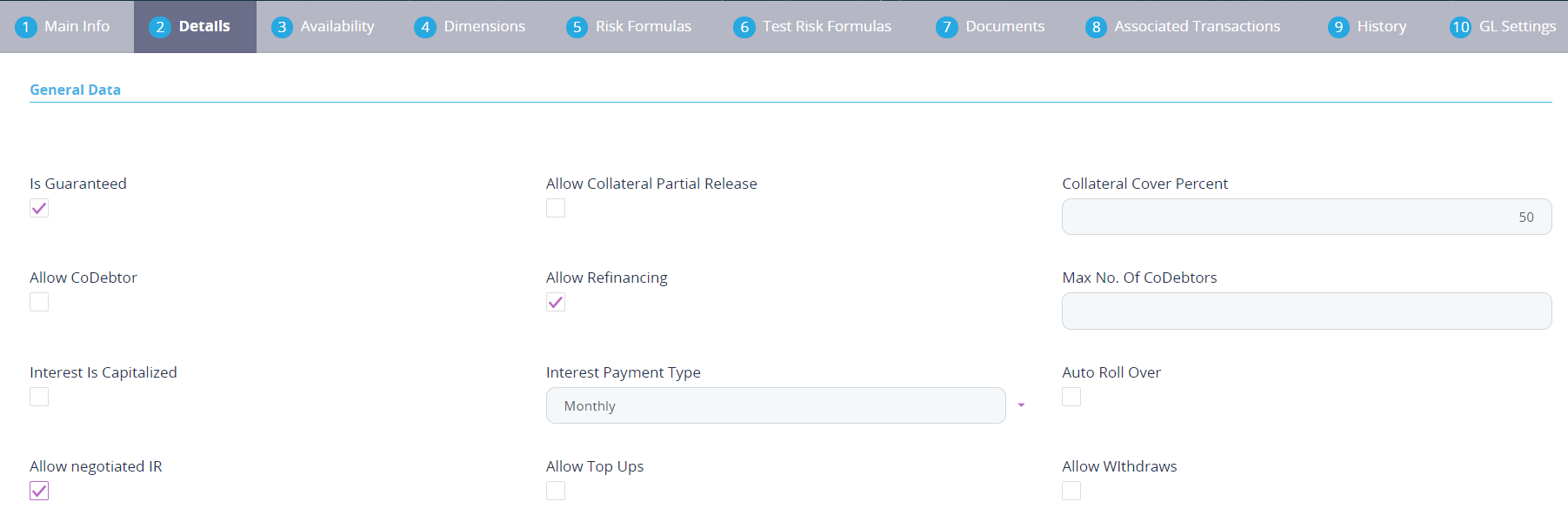
For the General Data section, the following fields are available:
| Field | Required | Data Type | Details |
|---|---|---|---|
| Is Guaranteed | Yes | Bool | This checkbox marks the product as secured or unsecured. NOTE The Collateral Cover Percent field appears when you select this checkbox. |
| Allow Collateral Partial Release | No | Bool | A partial release is a mortgage provision that allows some of the collateral to be released from a mortgage after the borrower pays a certain amount of the loan. |
| Collateral Cover Percent | No | Whole number | The percent that the collateral person on the contract pays. It usually is over 100%. |
| Allow CoDebtor | No | Bool | Select if another debtor exists for this product. |
| Allow Refinancing | No | Bool | Select if the account can be refinanced for this product. |
| Maximum Number of CoDebtors | No | Text | Set the maximum number of debtors possible for this product. |
| Interest Is Capitalized | No | Bool | Only applicable if there is an interest rate. Select if true. |
| Interest Payment Type | No | Option Set | Select the regularity of interest payments. Select one from the following:
|
| Auto Rollover | No | Bool | If the checkbox is selected, the contract is renewed at maturity date in exactly the same conditions. If it remains unchecked, the contract is automatically closed at maturity date. The field is used mostly for deposits or any product that can undergo the extension of contract. |
| Allow Negotiated IR | No | Bool | Select if for this product the interest rate is negotiable. |
| Allow Top Ups | No | Bool | Select if the amount can be topped up with a sum of money. |
| Allow Withdrawals | No | Bool | Select if the customer can take out money for this product. |
Click the Save and Reload button at the top right corner of the page.
In the Payment Schedule Types section, the following fields are available:
| Field | Required | Data Type | Details |
|---|---|---|---|
| Periodicity Type | Yes | Option set | Select the regularity of payments. Select one from the following:
NOTE If the measurement unit of the selected Periodicity Type = Days, then Holiday Shift For Repayment Installments = False and it cannot be changed. |
| Repayment Allocation Method | Yes | Option set | The repayment allocation method represents the recovery order of amounts from repayment notifications. You can specify if charges should be recovered with priority or maybe interest or principal. You can also split order by number of days overdue. Select a repayment allocation method from the list. |
| Holiday Shift For Repayment Installments | Yes | Bool | This checkbox marks if the holidays are considered for the calculation of the maturity schedule. NOTE The Country Calendars section appears if you select this checkbox. |
| Holiday Shift Method | No | Option set | Select from the list the method to be used when calculating the due date if that date falls to a holiday. The due date can be shifted before or after the holiday. Possible values:
Forward. |
| Defer Due Date | Yes | Bool | If you select the checkbox, the payment schedule calculates the next payment amount as if the due date has not changed even when the due date falls on a holiday. This checkbox is selected by default. |
| Grace Type | No | Option set | Select one from the list:
|
| Product Grace | No | Option set | Select one from the list. |
| Grace Days for Repayment | No | Whole number | Select one from the list. Insert the number of days for which the grace applies. |
In the Payment Schedule Types section, you can insert or create a payment schedule for the leasing product. To insert a new associated payment schedule type, click Insert Existing and select one of the existing types. Go to Payment Schedule Types to read more about this.
Click the Save and Reload button at the top right corner of the page.
In the Product Guarantees section, presented if the Is Guaranteed checkbox was selected earlier, you can insert or delete guarantees. To insert a guarantee, click the Insert Existing button and select one of the following:
- Cash collateral
- Real estate.
To insert a new guarantee, click Insert and fill in the name, code and select the guarantee type.
The Product Destination Types section allows for insertion or removal of existing destinations. Click Insert existing and select one of the existing destination types, or insert a new one. To create a new destination type, insert a name and specify if it is default. For this case, the following have been configured:
- Loan Collateral
- Loan disbursements
- Personal
- Repayments.
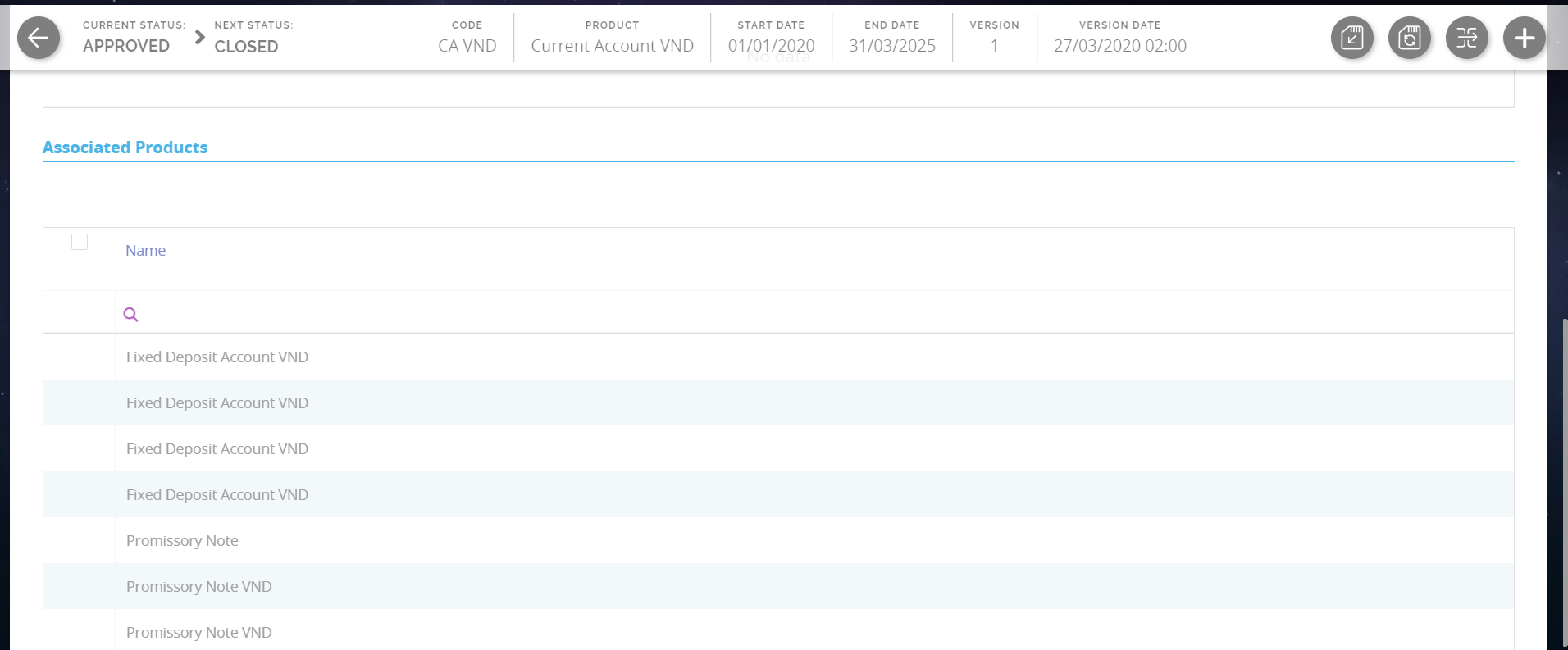
The Associated Products section allows for insertion or removal of existing products. It is especially useful when you wish to create a link between two products. You can insert or remove a product from the list or create a new one.
Click the Save and Reload button at the top right corner of the page.
Availability
The Availability tab determines the monetary range and the time frame when the product is available for customers.
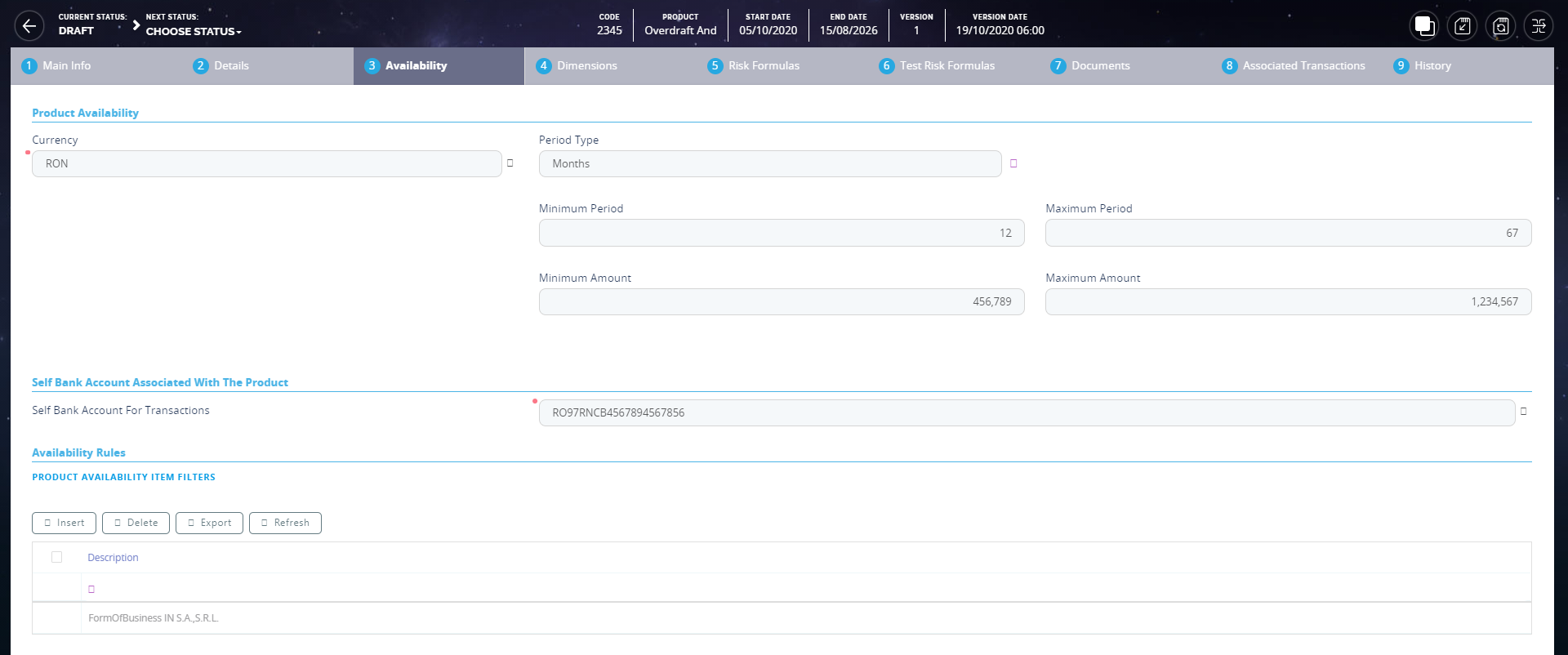
The following fields are available:
| Field | Required | Data Type | Details |
|---|---|---|---|
| Currency | Yes | Option set | Choose the currency for this banking product. |
| Period Type | No | Option set | Choose one:
NOTE The period type must be the same as the measurement unit of the Periodicity Type selected in the Details tab. |
| Minimum Period | No | Whole Number | The minimum duration of the product mentioned in the contract. |
| Maximum Period | No | Whole Number | The maximum duration of the product mentioned in the contract. |
| Minimum Amount | No | Whole Number | The minimum amount of the product for which the bank opens a contract. |
| Maximum Amount | No | Whole Number | The maximum amount of the product for which the bank opens a contract. |
| Start Period For Unusage After Activation (Months) | No | Whole Number | The start period for unused amount after the activation. |
| Minimum Advance (%) | No | Whole Number | The minimum down payment that must be paid for the leasing contract to be signed. |
| Maximum Advance (%) | No | Whole Number | The maximum advance that can be paid for the leasing contract to be signed. |
| Minimum Residual Value (%) | No | Whole Number | An estimate on the minimum amount the car or product is worth at the end of the lease term. |
| Maximum Residual Value (%) | No | Whole Number | An estimate on the maximum amount the car or product is worth at the end of the lease term. |
In the Availability Rules section you can select the item filters for the banking product. For more details, see Product Filter.

Click the Save and Reload button at the top right corner of the page.
In the Product Covenants section you can set certain conventions that applicants must abide by after getting the loan. This is usually applicable for corporate clients that must meet certain requirements in order to continue to receive disbursements. Click the Insert button to add a covenant to the product. You can select from 3 possible covenants:
-
Borrowers should perform tax obligations: the lenders expect the borrowers to perform their tax obligations to both the business and towards their employees. This covenant is of type affirmative.
-
Lender can monitor borrower's current ratio: the lender may continuously monitor the borrower's current ratio to ensure it stays relatively attractive and promising. This covenant is of type financial.
-
Lender posses the right to prevent merges or acquisitions: a clear stipulation that the lender possesses the right to prevent merges of acquisitions without proper notification or full knowledge of the process. This covenant is of type negative.
Each covenant can be attributed a value, an availability period, and a review frequency in months.
After all configurations are done, click the Save and Reload button.
Dimensions
The Dimensions tab displays the interests, commissions, insurances, discount and questions valid for a product.
You can insert, delete or export interest, commissions, insurances, discounts or questions. To add a new one, click Insert and fill-in the fields detailed in the sections below.
To configure the interest and commissions separately, navigate to Main > Banking Product Factory for Enterprise > Banking Product Dimensions menu which contains several other embedded menus.
Interest & Commissions
Click Insert. In the Interest & Commission Item page, fill in the following fields:
| Field | Required | Data Type | Details |
|---|---|---|---|
| Banking Product | Yes | Option set | Select the banking product. |
| Code | No | Text | Enter a code for this particular interest/ commission. |
| Item Name | Yes | Text | Enter a name. |
| Start Date | No | Date | The start date when the interest/ commission becomes effective. |
| End Date | No | Date | The end date for the interest/ commission. |
| Interest List | No | Option set | Select from which list the interest is a part of. |
| Commissions List | No | Option set | Select from which list the commission is a part of. |
| Minimum Interest Rate (%) | No | Numeric | Enter the percent applicable as a minimum interest rate at the contract level. |
| Is Negotiable | No | Bool | Select the checkbox to specify that every interest, commission or margin field at the contract level is negotiable and can be edited. |
Click the Save and Reload button at the top right corner of the page.
In the Interest & Commission Item Filters section, click Insert and fill in the following fields:
| Field | Required | Data Type | Details |
|---|---|---|---|
| Filter | Yes | Option set | Select a filter created earlier in the Product Filter. |
| Value/ Date | No | Text/Date | Select the beginning value/ date for the filter. |
| Until Value/ Until Date | No | Text/Date | Select the maximum value/ date for the filter. |
| Description | No | Text area | This field is automatically filled in after clicking the Save and Reload button. The values/ dates inserted above are turned into an expression. |
| For Lookup attributes | |||
| Filter | Yes | Option set | Select a filter created earlier in the Product Filter. |
| Option Set | No | Option set | It is automatically filled in with the option set name created for the attribute. |
| Description | No | Text area | It is left blank. Add a description if needed. |
| Grid of Options | No | Grid | This field is automatically filled in after clicking the Save and Reload button. The values of the option set are displayed. Select the bool for the values you wish to include in the filter. |

Click the Save and Reload button at the top right corner of the page.
Insurance
For any banking product, you can select a pre-existing insurance or create a new one. To add a new one, fill in the following fields:
| Field | Required | Data Type | Details |
|---|---|---|---|
| Banking Product | Yes | Option set | Select the banking product. |
| Code | No | Text | Insert a code for this particular insurance. |
| Item Name | Yes | Text | Insert a name. |
| Start Date | No | Date | It is the start date when the insurance becomes effective. |
| End Date | No | Date | It is the end date for the insurance. |
| Details | No | Text area | It is left blank. Add a description if needed. |
| Insurance List | No | Option set | Select from which list the insurance is a part of. |
Click the Save and Reload button at the top right corner of the page.
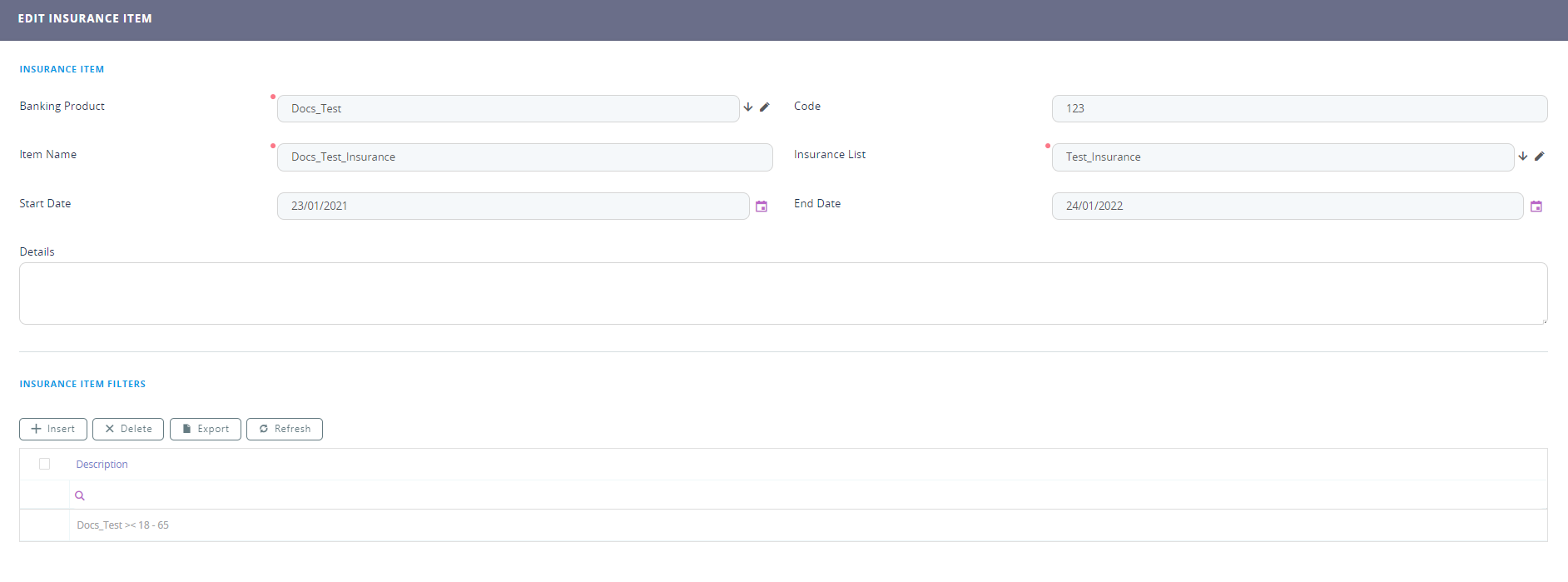
In the Insurance Item Filters section, click Insert and fill in the following fields:
| Field | Required | Data type | Description |
|---|---|---|---|
| Filter | Yes | Option set | The name inserted earlier. |
| Value | Yes | Text | The starting value for the attribute. |
| Until Value | Yes | Text | The ending value of the interval. |
| Description | No | Text area | Insert the proper description for the availability filter. |
Click the Save and Close button at the top right corner of the page.
Discounts
For any banking product, you can add discounts of any nature. You can select a pre-existing discount or create a new one.
Click the Insert button. In the Details page, fill in the following fields:
| Field | Required | Data Type | Details |
|---|---|---|---|
| Name | Yes | Text | Insert the appropriate name for the discount. |
| Discount | No | Option set | Choose one of the pre-configured types of discounts or create a new one. According to the selected type, new fields appear on the page requiring to be filled in. |
| Value discount | No | Numeric | Insert the value of the discount to be applied, e.g. 15. |
| Start date | Yes | Date | It is the start date when the discount becomes effective. |
| End date | Yes | Date | It is the end date for the discount. |
| Applied to dimension | No | Option set | Specifies for which product dimension this discount is applicable (interest, commission or insurance). This is autocompleted by the selected discount's dimension. |
| Commission type | No | Lookup | This field appears if the selected discount = Commission discount or Management Fee Discount. Specifies for which commission type this discount is applicable. This is autocompleted by the selected discount's default commission type. |
| Commission | No | Lookup | This field appears if the selected discount = Commission discount or Management Fee Discount. Specifies for which commission this discount is applicable. This is autocompleted by the selected discount's default commission. |
| Insurance class | No | Lookup | This field appears if the selected discount = Discount Life Insurance or Interest Discount. Specifies for which insurance class this discount is applicable (credit, home, life or other insurance class). This is autocompleted by the selected discount's insurance class. |
| Insurance | No | Lookup | This field appears if the selected discount = Discount Life Insurance. Specifies for which insurance this discount is applicable. This is autocompleted by the selected discount's insurance. |
| Interest type | No | Lookup | This field appears if the selected discount = Interest discount. Specifies for which interest type this discount is applicable. |
| Use Banking Formula | No | Bool | If you select this checkbox, the discount is calculated using the Banking Formula engine. |
| Is optional discount? | No | Bool | Selecting this checkbox results in the discount being applied only if the customer agrees to the discount. |
| Is percentage | No | Bool | If you select this checkbox, the discount is calculated as a percentage from the contract's amount. |
| Destination entity | No | Option set | Select the entity where to register the discount. This field opens when the Is optional discount? checkbox is selected. |
| Destination entity attribute | No | Option set | Select the attribute where to register the discount. This field opens when the Is optional discount? checkbox is selected. |
Click the Save and Reload button at the top right corner of the page.
In the Product Discount Item Filter section, click Insert and fill in the fields as specified in the Product Filter page. The fields displayed depend on the selected filter.
Click the Save and Reload button at the top right corner of the page.
Questions
Choose one or more questions to add to the banking product, or insert a new one.
To insert a new question, click Insert existing, then click Insert. In the Add Banking Product Question page, fill in the following fields:
| Field | Required | Data type | Description |
|---|---|---|---|
| Question | No | Text | Enter the appropriate name. |
| Answer Type | No | Option set |
Select the type of answer the customer has to give:
|
| Answer Entity | No | Option set | Select the entity where the answer is stored. |
| Answer Field | No | Option set | Select the attribute where the answer is stored. |
Click the Save and Reload button at the top right corner of the page.
The Banking Products List shows where the question is used.
The question has to be activated in order for it to be added to the banking product.
Click the Save and Close button at the top right corner of the page.
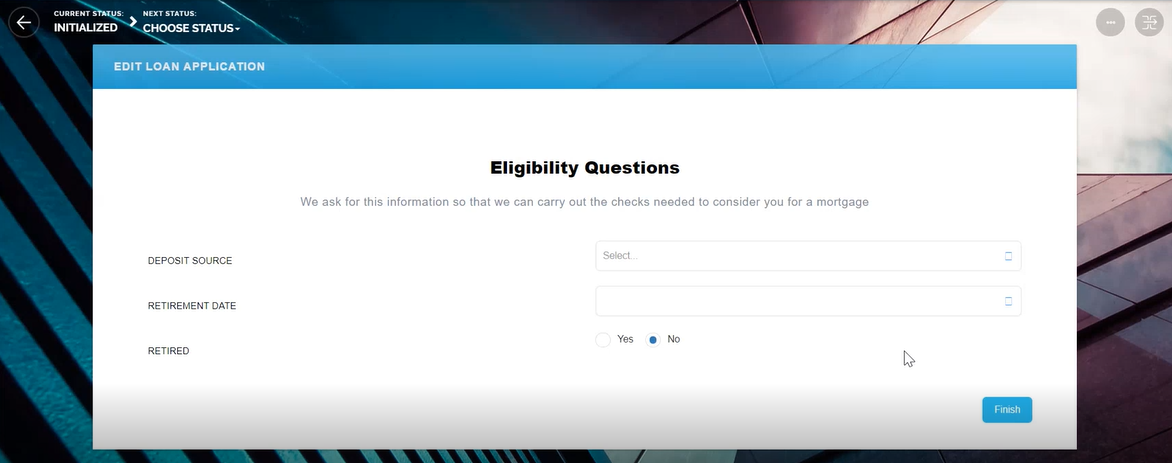
For example, this is how a question is displayed in a digital journey in the FintechOS Portal:
Risk Formulas
The Risk Formulas tab keeps formulas built with Formula Engine for the banking product. Such formulas can be used to determine the eligibility of a customer.
In the Banking Product Formula section, choose an already defined formula or click Insert to configure a new one, for example a formula for eligibility or scoring purposes. For information on how to build a formula, see Define Formula Inputs.
In the Add Banking Product Formula page, fill in the following fields:
| Field | Required | Data type | Description |
|---|---|---|---|
| Name | No | Text | Enter an appropriate name. |
| Banking Product | No | Option set | The name of the banking product is inserted automatically. |
| Formula Type | Yes | Option set | Select the type of formula configured before, e.g. scoring /eligibility. |
| Formula | Yes | Option set |
Select the previously configured formula. IMPORTANT!
The formula must be activated before attaching it to a product. |
After selecting the desired formula, click Save and reload, then click Map Data.
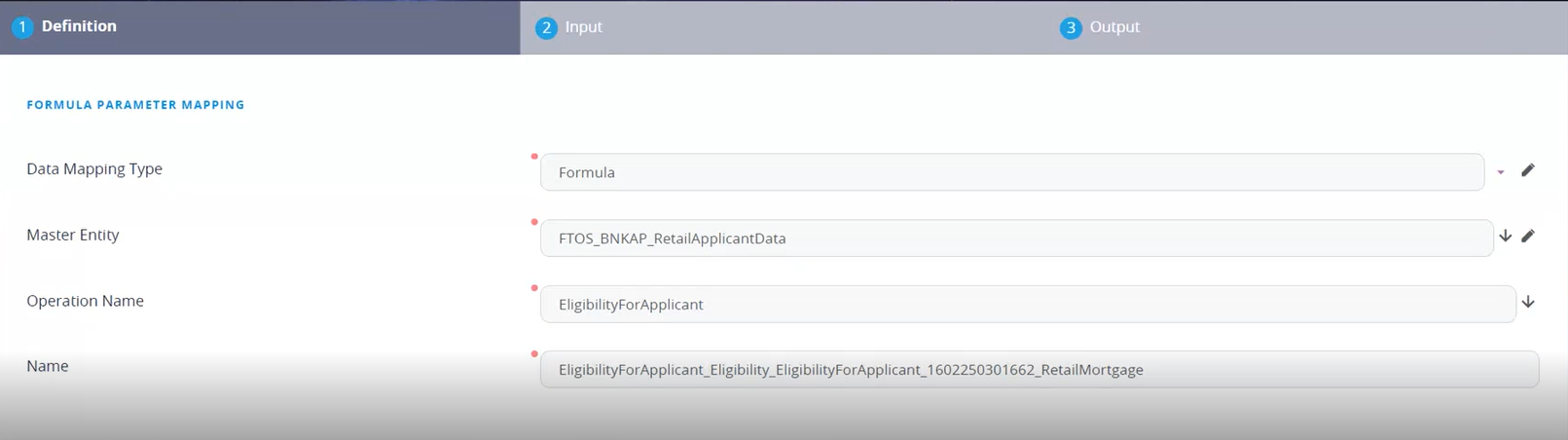
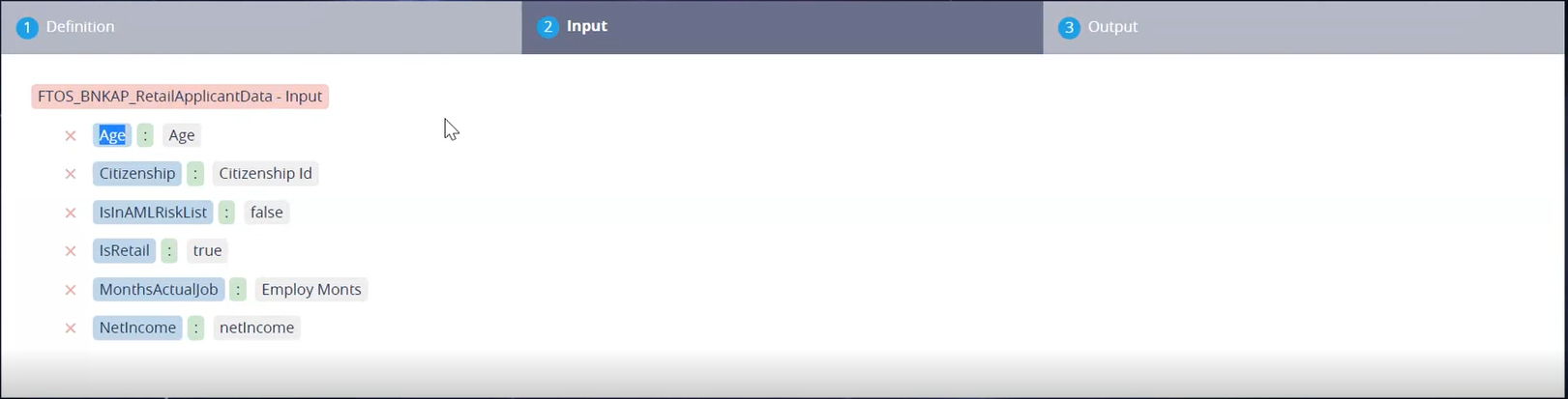
In the Formula Mapping page, click Input and configure the input data for the formula.
Click Output and configure the output for the formula.

Click the Save and Close button at the top right corner of the page.
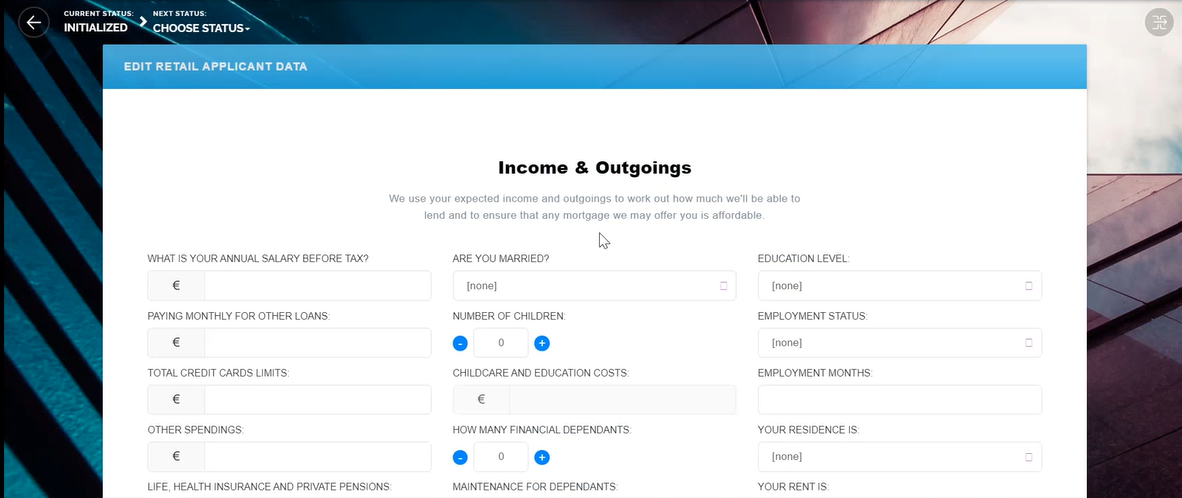
Such formulas can be used in digital journey steps, for example when the customer inserts their financial data.
Test Risk Formulas
A good practice is to test the formula before displaying it in a digital journey. You can do that in the Test Risk Formulas tab.
Insert Test Scenario Type from the option set. The keys and the values are shown. Click the Save and Reload button at the top right corner of the page.
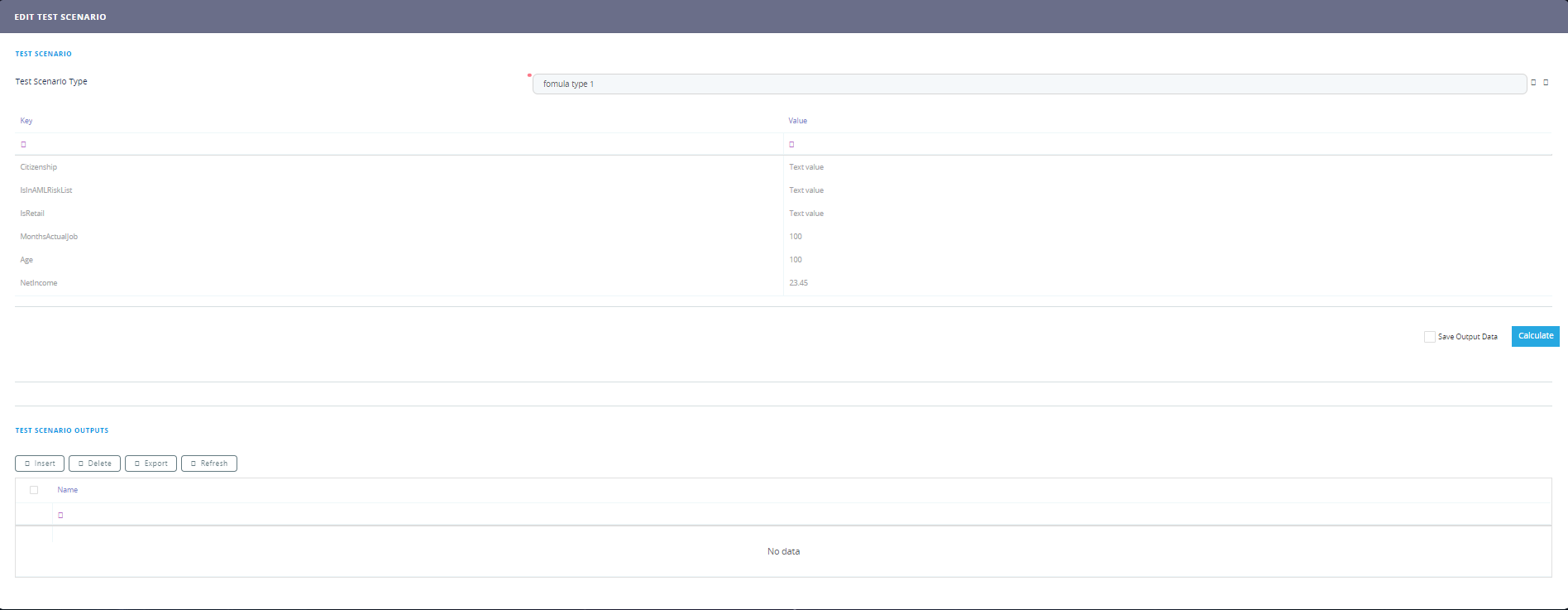
Click the Calculate button. The outputs are displayed in the Test Scenario Outputs section. These outputs can be saved by selecting the Save Output Data checkbox next to Calculate.

Documents
The Documents tab contains all the attached documents available for a product. The previously associated documents are displayed in the Banking Product Documents section.
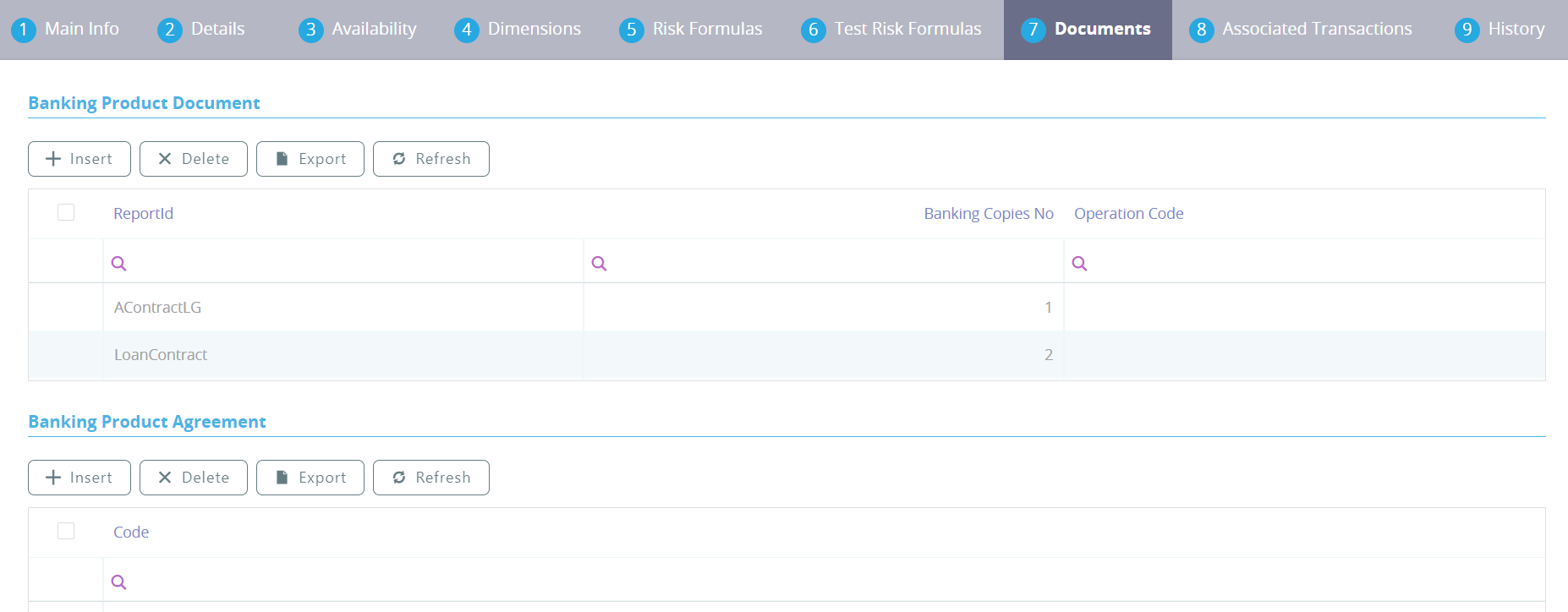
To attach a new document to the banking product, click Insert and fill in the following fields:
| Field | Data Type | Description |
|---|---|---|
| Operation Code | Whole number | Enter a code for the document. |
| Banking Copies No | Whole number | Insert the number of copies made. |
| Report | Lookup | Select a document from the list. |
| Document Type | Option set | Select a document type from the list. |
| Is Mandatory | Bool | Select if the document is mandatory. |
| Includes Debtor | Bool | Select if the document includes the debtor. |
| Includes Coborrower | Bool | Select if the document includes the co-borrower. |
| Requires Signature | Bool | Select if the document requires to be signed. |
| Is accord | Bool | Select if the document represents the accord. |

Click the Save and Close button at the top right corner of the page.
The agreements that a customer needs to go through are displayed in the Banking Products Agreement section. To attach a new agreement to the banking product, click Insert and fill in the following fields:
| Field | Required | Data Type | Description |
|---|---|---|---|
| Agreements | Yes | Option set | Select an agreement from the list. |
| Banking Product | Yes | Option set | It is automatically filled in. |
| Code | No | Whole number | Insert the corresponding code. |
| Is Mandatory | No | Bool | Select if the agreement is mandatory for the product. |

Click the Save and Close button at the top right corner of the page.
For more information on how to configure a contract or an agreement, see the Digital Document Processor.
Associated Transactions
Transactions types that are performed to and from a banking product are displayed in the Associated Transactions tab.
For each banking product, you must select a bank account to be used for transactions. Next to the Self Bank Account For Transactions field, select a value from the list to be the current account from which or to which the money is wired from or to.
This account must have the same currency as the product, because the translations are performed from and into this account.
In the Transaction Types section, you can associate possible transaction types with the selected banking product. Click Insert existing and select the desired transaction types.
Double-click a selected transaction type to edit it. In the Edit Transaction Type section, fill in the following fields:
| Field | Required | Data Type | Details |
|---|---|---|---|
| Transactions Operations Type | Yes | Option set | This field makes the connection with the transaction motor of bank accounts. Select one of the methods defined within the system. NOTE There is no integration at this point with a payment gateway. |
| Is Automatic Transaction | Yes | Bool | This checkbox marks the transaction as automatic. If selected here, then you cannot select it within the contract operations. |
| Is System Transactions | No | Bool | This checkbox marks the transaction as being neither a credit of the account, nor an allocation of funds, but a transaction that does not influence other transactions within the account. System transactions are meant to be used only for accounting. |
| Name | Yes | Text | Name of the transaction type. |
| Transaction Code | Yes | Text | The code of the transaction type. |
| Generates Accounting Entry | Yes | Bool | This checkbox allows you to create an entry in the general ledger. It generates records in the Accounting Entry entity. |
| Source Entity ID | Yes | Option set | The ID of the entity referenced by the accounting systems. |
| Generate New Contract Version | No | Bool | This checkbox allows you to specify if a new contract version should be generated by this transaction type. |
| Commission Type | No | Lookup | The transaction type for which this transaction type is applicable. |

You can also edit the information in the Transaction Value Types, Transaction Item Accounting Configurations and Transaction Accounting Models sections. Read more details about Transaction Types in the Operational Ledger User Guide.
Click the Save and Close button at the top right corner of the page.
History
The History tab displays the versions of the banking product, their workflow status and the user who modified the product.
Here you can track the product's life cycle and review older versions that are no longer active (for details, see Banking Products' Life Cycle).
GL Settings
In the Banking Product GL Accounts section, you can set specific accounts to be used by the Operational Ledger system for transactions performed on contracts based on this banking product. Thus, you can overwrite the generic settings of the Operational Ledger, instructing it to use the accounts specified at banking product level.

To add specific accounts to be used by Operational Ledger, click Insert and fill in the following fields in the displayed Add Banking Product GL Account page:

| Field |
Required |
Data Type | Description |
|---|---|---|---|
| Product | Yes | Option set | Select from the list the banking product. Automatically completed with the banking product you are currently editing. |
| Accounting System | Yes | Option set | Select from the list the desired accounting system. The list contains the records created in the FTOS_GL_AccountingSystem entity. |
| Accounting Scope | Yes | Option set | Select from the list the corresponding accounting scope. The list contains the records created in the FTOS_GL_AccountingScope entity. |
| Item | No | Option set | Select from the list the corresponding transaction item. The list contains the records created in the FTOS_GL_TransactionItemAccountingConfig entity. |
| GL Account | Yes | Option set | Select from the list the corresponding GL account. The list is filtered based on the previously selected accounting system. It contains the accounts defined in the FTOS_GL_AccountingChart entity that were added to the chosen accounting system record. |
Click the Save and Reload button at the top right corner of the page.